Description
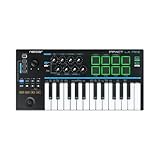
The Nektar Impact LX Mini MIDI Keyboard & Controller is New Delivered to all areas of the UK using our roadie delivery service.
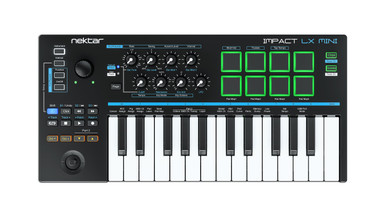
The Nektar Impact LX series offers a streamlined set of controller keyboards with deep integration with the most popular Digital Audio Workstations. The LX Mini is Nektar's latest addition to the collection, offering a portable and compact solution for all music makers on the go. It features a 25-note mini keyboard with a choice of 4 velocity curves, two arpeggiators, drum pads and all the necessary knobs and buttons to easily take control over your DAW.
KEY FEATURES:
- Universally compatible with any MIDI music software on Mac OS, Windows, iOS and Linux,
- 25 velocity-sensitive mini keys
- Joystick for pitch bend
- Footswitch to connect a sustain pedal
- 8 velocity-sensitive pads
- 2 Arp/Repeat engines (one for the keys and one for the pads)
- Instrument Mode button, that switches the knobs to control instrument parameters in most DAWs
ALL THE FEATURES YOU NEED TO PLAY, PERFORM AND PRODUCE
The LX Mini carries the legacy of all LX MIDI controllers putting everything you need to produce your music at your fingertips. The LX Mini features a 2-octave keyboard with velocity-sensitive keys, as well as 4 velocity curves and 3 fixed values to tailor your keyboard's response to your playing style.
You'll also have access to 8 velocity-sensitive pads, ideal for finger-drumming, and 8 knobs that by default control the Arp/Repeat mode. However, when you activate Instrument Mode your knobs switch to controlling the virtual instrument parameters on your DAW instead. Keys and pads have their own arpeggio engine, allowing you to create two completely rhythmic figures on two different instruments, like bass and drums.
On top of that, the LX Mini features MIDI-assignable transport buttons and an expressive joystick for pitch bend.
PART 2: THE ULTIMATE TOOL TO SPICE UP YOUR PERFORMANCE
Part 2 is a unique performance feature for momentary setup changes: While playing, press one of the dedicated “Part 2” buttons to momentarily shift the octave up or down, transpose, layer another octave on top, switch to another MIDI channel altogether – or any combination of these features.
When you let go of the buttons, Impact LX Mini reverts back to its original settings. What’s more, any note that was played prior to pressing “Part 2” will keep playing at the original settings – so you could play and hold some really low bass notes, while playing a solo over the top. You’d like to latch your setting? Simply press the second Part 2 button while still holding the first. Part 2 will help you play in new ways, not even possible on larger keyboards!
NEKTAR DAW INTEGRATION
Forget about your mouse! Thanks to Nektar DAW Integration you'll be able to use your transport buttons to navigate through projects and locators in your DAW, select patches, launch windows and more!