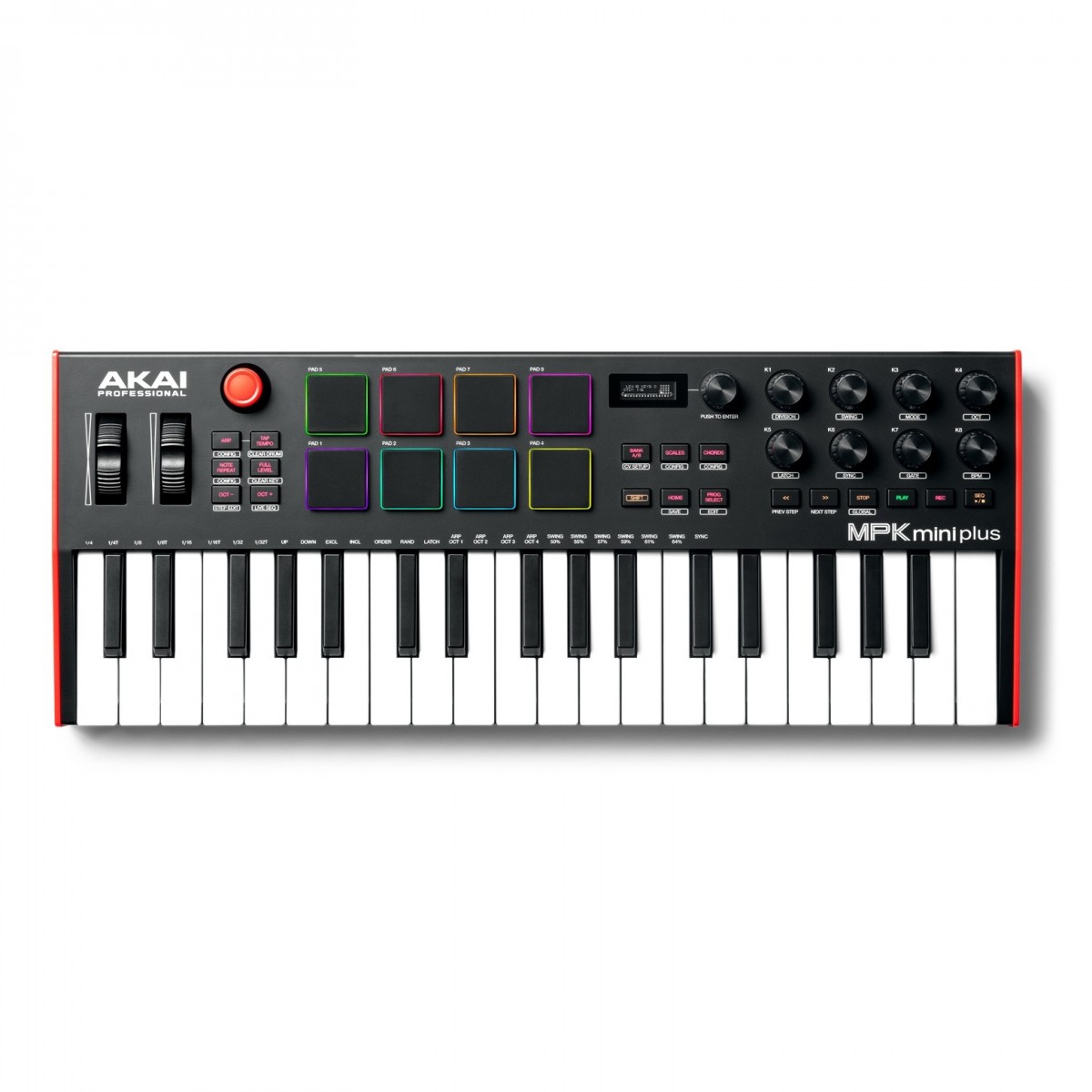
The Akai Professional MPK Mini Plus 37-Key MIDI Keyboard builds on the design of the original MPK Mini with an expanded control section and rear-panel connections that now include CV and MIDI connectivity. The control section featured dedicated transport controls and a new 360-degree rotary knob that allows you to dial in your settings and effects. It also features a brand-new polyphonic step sequencer which allows you to capture ideas on the fly and create loops and patterns with ease. It also includes new dedicated Pitch Bend and Modulation Wheel controllers – perfect for live performances and added expression in the studio At the heart of the MPK Mini Plus is the second-generation keybed provides optimal expression and accurate articulation. This ensures you capture every nuance of your performance reacting to the slightest touch to capture every detail. The classic MPC pads make a return with RGB backlit lighting that delivers that classic MPC touch and feel. The MPC pads are perfect for finger-drumming creating percussive loops and chopping samples. Dial-in settings and parameters with ease using the eight assignable endless encoders. The iconic joystick controller can also be used for tactile expression allowing you to control various CC parameters and much more. With the inclusion of CV and MIDI connectivity you can use the MPK Mini Plus with your favourite modular synths and outboard gear. Use the keybed to control notes from a modular synth or use the MIDI connectivity to hook the MPK Mini Plus up to your favourite synthesizers and sequencing units. Complete with the MPK Mini Plus is the MPC Beat DAW for both Mac and PC. Featuring thousands of samples drum sounds loops and plug instruments; the MPC Beats DAW gives you everything you need to unleash your creativity. The MPK Mini also now supports NKS integration allowing you to use Native Instruments plugins to their full potential. Also included is your choice of one of three Komplete Select bundles each tailored to different production styles. Now supports Native Instruments NKS ecosystem with Komplete Select and more! Native Instruments has opened up the NKS Hardware Partner Program allowing third-party controllers to integrate with the NKS ecosystem for the first time. Previously only NI’s own hardware (like the Kontrol S-Series and Komplete Kontrol A-Series)had this capability. Now millions of producers and performers can experience seamless hardware-software integration with partner controllers all while accessing NI’s legendary sounds. Every compatible controller will include a Komplete 15 Select voucher giving users instant access to a powerful sound library. Exclusive to Akai controllers the three Komplete Select bundles also include some plugins not available to other controllers. You can choose from each package to suit your production style; comprised of: Beat Band and Electronic packages. Whether youre into beatmaking songwriting or electronic production there’s a Komplete 15 Select edition tailored to your needs. Plus existing hardware owners can claim a free voucher making it the perfect time to explore the expanded NKS workflow. Expanded and enhanced for professionals Building on the now iconic design of the MPK Mini the MPK Mini Plus utilises all the design aspects that made the original a best seller for Akai with the inclusion of fan-requested features and expanded connectivity. New dedicated transport control allows you to fully integrate with your favourite DAW and optimise your workflow – minimising the need to constantly swap between the MPK Mini Plus and your mouse/keyboard. In addition to the eight endless encoders there is an additional encoder included for navigating between settings and parameters using the built-in OLED display. Gen 2 dynamic keyboard – now with Pitch Bend and Modulation wheels Incorporating the same keybed from the MPK Mini the MPK Mini Plus enhances this expressive design with the addition of dedicated Pitch Bend and Modulation wheels. Providing added expression for both live performances and studio sessions the inclusion of the wheels expands your sonic palette allowing you to make on-the-fly changes to timbre and pitch. The Gen 2 keybed has been optimised to capture every nuance of your performance providing maximum expression for highly accurate articulation. From creating loops and full songs the MPK Mini Plus provides you with everything you need to get there. Classic-style RGB MPC pads and new step sequencer Some MIDI keyboards have performance pads but none measure up to the feel and design of the MPK Mini. Taking inspiration from classic gear such as the MPC 2000 the MPK Mini Plus incorporates classic-style MPC pads that have the same feel and touch as the vintage drum machines.MPC pads are renowned for their dynamic feel and expressiveness reacting to your touch with precision. The eight onboard velocity-sensitive RGB pads are ideal for chopping samples finger-drumming creating melodies and much more. Accompanying the pads are eight rotary knobs. The “endless” encoders allow you to dial in parameters with ease perfect for controlling automation volume and other settings. Simply assign any of the encoders to a parameter within your music software and dial in your settings without boundaries. Another new addition to the design is the inclusion of a polyphonic step sequencer. This advanced sequencer allows you to create drum patterns record melodies and craft loops on the fly. The iconic Joystick Controller also makes a return for tactile expression. Expanded connectivity – now with CV/MIDI connections Expanding on the original design of the MPK Mini the Plus version features expanded connectivity with the inclusion of both MIDI and CV connections located on the rear panel. There are three CV/Gate connections including Pitch Gate and Mod. There is also Clock I/O allowing you to sync multiple devices together – perfect for live performances and synchronised studio sessions. It also includes MIDI I/O for use with external instruments such as sequencers drum machines and some synthesizers. Complete with MPC Beats (digital audio workstation) Start creating music straight out of the box thanks to the MPC Beats DAW music software. MPC Beats is an intuitive DAW that allows you to record edit and arrange music with advanced controls and in-depth sound design capabilities. Craft your songs from thousands of melodic sounds drum samples loops and virtual plugin instruments. Included within MPC Beats are powerful plugin instruments such as Electric and Tubesynth that provide everything from eclectic soundscapes to soaring leads and smooth pads. Features What’s New 37-note Gen 2 dynamic keybed with aftertouch Dedicated transport controls – control CC parameters and more within your chosen music software Pitch Bend and Modulation wheels provided added expression CV/Gate I/O connectivity for use with modular synths Eight RGB-backlit MPC drum pads 5-pin MIDI I/O Clock I/O connectivity allows you to synchronise multiple devices/instruments together Polyphonic step sequencer for creating loops patterns and sequences General Compact MIDI keyboard controller Crisp OLED display for immediate parameter feedback Four-way joystick controller Onboard arpeggiator Eight endless encoders for dialling in settings levels and automation Complete with MPC Beats DAW and plugin instruments Portable design with USB bus power Specifications Dimensions (HxDxW): 2.04 x 7.08 x 17.76 inches Weight: 2.78 kg Product Code: MPKMINIPLUS
Search results for: “Akai MPC X”
-
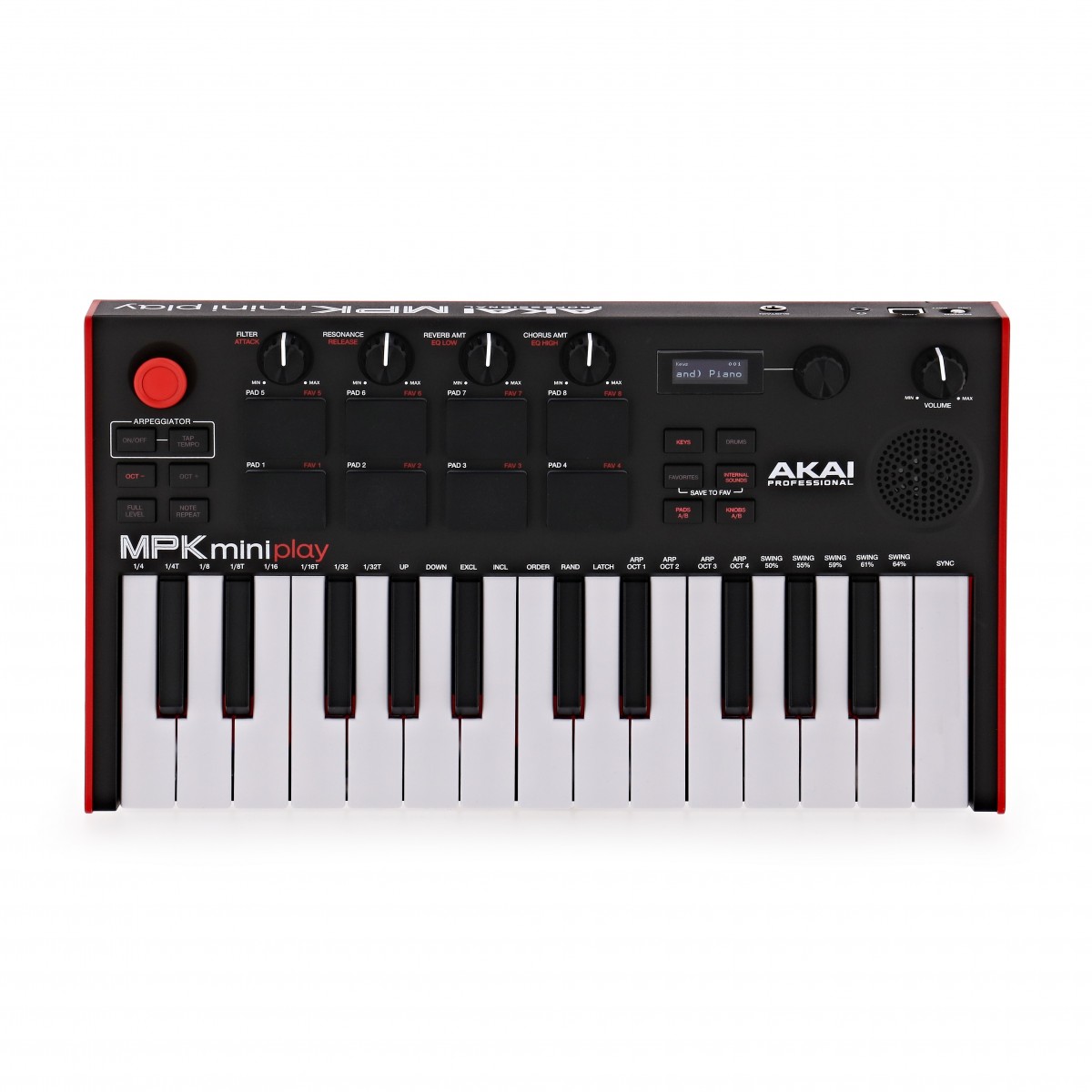
Akai Professional MPK Mini Play MK3 Keyboard and MIDI Controller MIDI Controller
The Akai Professional MPK Mini Play MK3 Keyboard and MIDI Controller is the next-level upgraded MIDI keyboard in a compact and portable housing for travelling musicians. Building on the excellent reputation of previous models the MK3 introduces several upgraded parts to improve performance playability and functionality. With the MPK Mini Play MK3 you can perform exactly as you mean to with complete authenticity thanks to the upgraded Gen 2 keybed as well as hear back exactly how your music will sound with particular attention to the low-end through the redeveloped onboard speaker. Eight improved MPC-style pads give you tactile control over the percussion elements of your performance for an improved response as well as extended durability over time. Combining playability with functionality and portability the MPK Mini Play MK3 is the ideal tool for music creation anywhere you go. The small footprint class-compliant USB or battery-powered keyboard offers up to 14 hours of playtime for completely wireless music creation. For musicians of all abilities the MPK Mini Play MK3 comes bundled with several software solutions including MPC Beats for music production as well as Melodics for your musical education. With over 128 internal sounds youll never run out of choice when creating the music youve always wanted to. Take control of your sessions and use the Akai Professional MPK Mini Play MK3 as a controller using the four assignable knobs controlling MIDI parameters of your sessions including Pan automation and precise editing. Perfect for producers and musicians the MPK MK3 offers a new unique way to the music youve always wanted to. The MPK Mini also now supports NKS integration allowing you to use Native Instruments plugins to their full potential. Also included is your choice of one of three Komplete Select bundles each tailored to different production styles. Now supports Native Instruments NKS ecosystem with Komplete Select and more! Native Instruments has opened up the NKS Hardware Partner Program allowing third-party controllers to integrate with the NKS ecosystem for the first time. Previously only NI’s own hardware (like the Kontrol S-Series and Komplete Kontrol A-Series)had this capability. Now millions of producers and performers can experience seamless hardware-software integration with partner controllers all while accessing NI’s legendary sounds. Every compatible controller will include a Komplete 15 Select voucher giving users instant access to a powerful sound library. Exclusive to Akai controllers the three Komplete Select bundles also include some plugins not available to other controllers. You can choose from each package to suit your production style; comprised of: Beat Band and Electronic packages. Whether youre into beatmaking songwriting or electronic production there’s a Komplete 15 Select edition tailored to your needs. Plus existing hardware owners can claim a free voucher making it the perfect time to explore the expanded NKS workflow. Ultimate travel companion Musical inspiration can strike at any time. Thankfully no matter where you may be in the world the MPK Mini MK3 Keyboard can be there to let you capture your creative spark in a moment. The ultimate travel companion for the on-the-go musician the MPK MK3 runs of battery-operated performance with over 14 hours of charge letting you free yourself from tethered power chords and cables. This wireless connectivity also helps to reduce your carry load for stripped-down travel carrying only what you need and leaving any bulky power cables behind. Newly designed upgraded speakers deliver increased output with an improved low-end response ensuring you can hear the minutia of your recordings or performances better than on previous models. With 128 onboard instruments drum kits acoustic and electric pianos synths pads and much more you dont need any external equipment to enjoy music in every form. For those moments where you need something extra the 1/8-inch headphone output can be used to connect to your favourite pair of headphones or alternatively a speaker system for more output. Professional performance Built around the new Gen 2 keybed the MPK Mini Play MK3 delivers dynamic performance with accurate velocity response. For new players to hardened professionals the feel of the updated Gen 2 keybed will ensure that every emotion and nuance in your performance will be captured and translated into your MIDI notes. A feature of the MPK series is the portability factor ensuring that you have all the tools at your disposal to create the music you want to wherever you are. With this in mind the MPK Mini Play MK3 maintains its sleek compact footprint whilst delivering improved playability and comfort than on previous models. The eight onboard drum pads have been upgraded to velocity-sensitive pads found on Akai MPC models offering a more responsive feel for accurate percussion performances. The class-compliant plug and play capability ensure that no matter what system you are using the MPK Mini Play MK3 can adapt to your needs. Not only functioning as a powerful MIDI keyboard but you can also use the MPK Mini MK3 as a production controller using the four onboard assignable rotary encoders for tactile control over your DAW. Draw in automation edit tracks with precision or change panning all with the onboard rotary encoders. Ditch the mouse and use the onboard controls to speed up your production and post-production sessions to work done faster than ever before. Unlimited creativity with MPC Beats software MPK Mini Play MK3 comes bundled with MPC Beats a powerful software DAW that is based on iconic MPC hardware. Music-makers will be able to dive deep and unleash their creativity with the wide range of included musical instrument plugins effect plugins and samples. MPC Beats includes plug-ins that have been developed by award-winning sound design company AIR Music Technology to ensure that no matter what level of ability you are you can always create immaculate and professional sounding music. Supercharge your writing sessions and take advantage of these professional and excellent sounding instruments loops and plug-ins to get to your end-goal quickly. Educational software included To get you started in your journey of music production the MPK Mini Play MK3 comes included with the Melodics educational package. Available in both desktop and iPad format to use on the go and at home Melodics is a series of instructional lessons for MIDI keyboard devices that offers tailored cross-genre lessons in real time. To help refine your music creation skills Melodics also offers feedback to give you helpful hints and tricks in your music creation journey. With 60 free downloadable lessons Melodics can be your mentor both on the go in the studio at home or anywhere inspiration strikes to progress your ability. FeaturesSmall footprint allows you to travel anywhere and create music Dive into music creation with free download MPC Beats software DAW Plug-ins within MPC Beats brought to you by AIR Music Technology VST instruments include Hybrid 3 – a powerful polyphonic analog synth Mini Grand – An acoustic piano instrument and Velvet – a vintage electric piano Battery powered mini keyboard instrument Over 100 internal drum and instrument sounds New larger built-in speaker with increased volume and low-end response Premium 25-key Gen-2 dynamic keybed Eight real MPC drum pads for responsive performance and extended durability Four assignable knobs to control MIDI parameters Assignable joystick OLED display for visual feedback 1/8-inch headphone output jack USB port for Class Compliant MIDI controller functionalitySpecificationsPower: Via USB or 4 AA alkaline batteries Dimensions: 317 x 178 x 58 mm Weight: 0.86 kg Product code: MPKMINIPLAYMK3
-
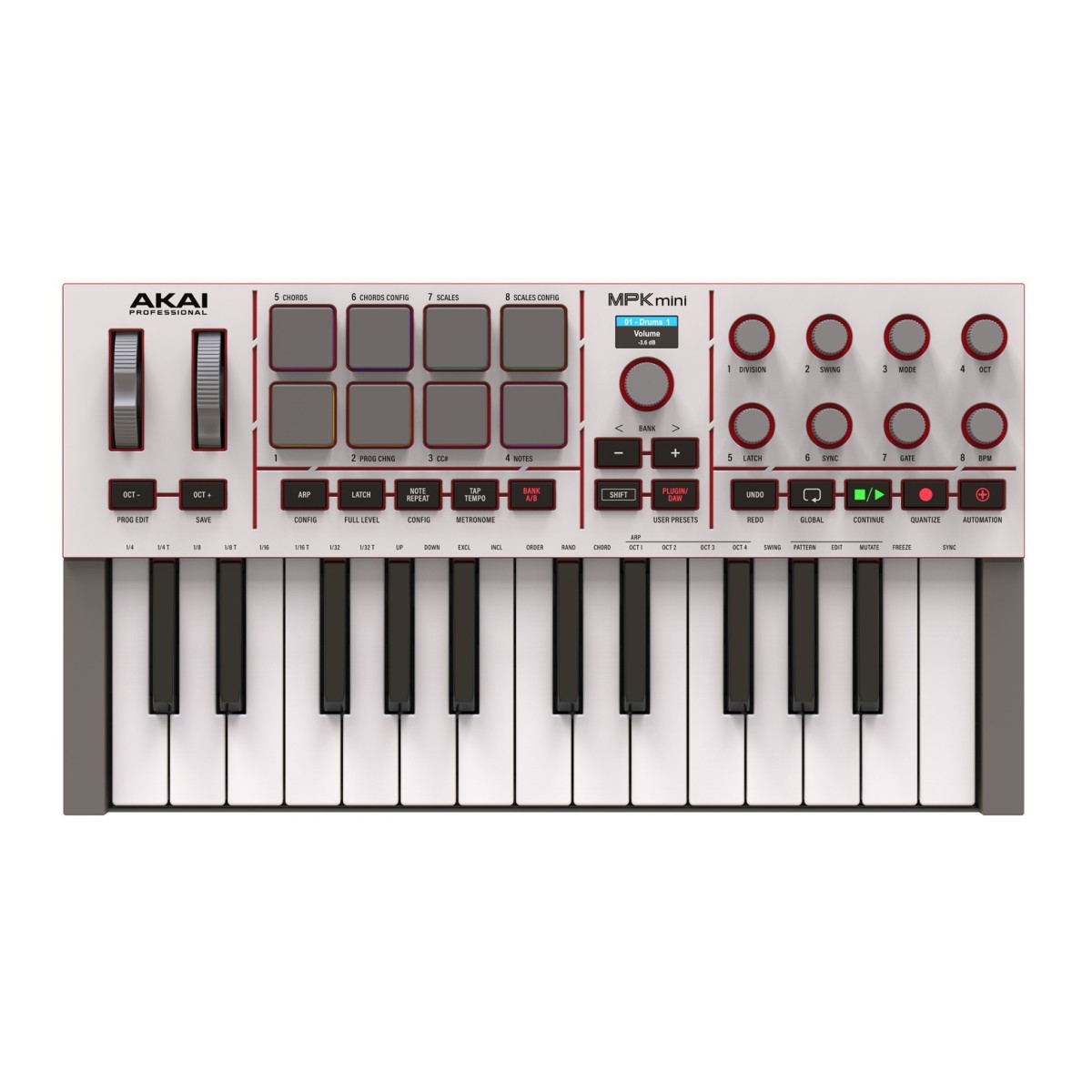
Akai Professional MPK Mini MK4 Compact MIDI Keyboard & Pad Controller Grey MIDI Controller
The Akai Professional MPK Mini MK4 is built for producers beatmakers and musicians who need a compact controller that delivers full creative control without taking up space. It features a redesigned 25-key velocity-sensitive keybed that feels smooth and responsive making it easier to lay down melodies chords and basslines. Real pitch and modulation wheels give you accurate and hands-on control when performing or fine-tuning your sound. Eight RGB-backlit MPC pads respond to both velocity and pressure making them ideal for finger drumming sample triggering and clip launching. Each pad is highly responsive and can be assigned across two pad banks for more performance options. The MK4 also includes eight assignable rotary knobs an expanded transport section and a full-colour screen that gives you clear visual feedback as you work. The MPK Mini MK4 also comes with the Studio Instrument Collection a virtual instrument plugin featuring over one thousand studio-ready sounds from AIR Akai Pro and Moog. Built for expressive control in a compact form The MPK Mini MK4 features a redesigned keybed that responds naturally to your playing. With 25 velocity-sensitive keys and 10 octaves accessible through simple octave shift buttons you can cover a wide range of notes without a full-size keyboard. The addition of real mechanical pitch and modulation wheels gives you tactile hands-on control for bends modulation effects and more accurate performance input. You can shape your sounds with intent not just convenience. The RGB backlit MPC pads are velocity- and pressure-sensitive making them ideal for finger drumming or triggering samples. With two pad banks you can assign up to 16 pads giving you more options for layering and performance. This combination of expressive features in a compact unit makes the MK4 a strong choice for mobile producers and home studios alike. Flexible connectivity for modern and classic setups The MPK Mini MK4 includes both USB-C and a full-size 5-pin MIDI output giving you reliable connections to your computer and external gear. USB-C handles both power and data so you can plug directly into a laptop or tablet without extra cables or adapters. The MIDI output lets you control classic synthesisers grooveboxes or other MIDI-enabled instruments directly making the MK4 useful beyond a digital-only environment. This controller also includes a 1/4-inch input for a sustain pedal which adds another layer of expression for keyboard players. It is designed to slot into any setup and keeps things simple so you can focus on creating rather than troubleshooting connections. Software suite with 1000+ studio sounds included The MPK Mini MK4 comes with free access to the Studio Instrument Collection. This exclusive virtual instrument gives you over 1000 professionally crafted presets from leading software developers including AIR Akai Pro and Moog. These presets cover a wide range of sounds from vintage synths and basses to modern leads and keys making it easy to start building tracks straight out of the box.Because the MPK Mini MK4 offers pre-mapped controls you can browse and tweak presets directly from the controller. No mouse is needed. This keeps your workflow quick and your focus on music not navigating menus. Everything is designed to work together making it easy to stay inspired during your sessions. Creative tools that support musical exploration Several built-in performance tools help shape your ideas into finished pieces. Intelligent Scale and Chord modes allow you to play in key and build harmonies even if your keyboard skills are limited. These features help remove the guesswork when writing melodies or progressions and encourage more musical results without extra effort. An upgraded arpeggiator adds Pattern Freeze and Mutate functions. These give you more control over rhythmic variations and help generate new riffs or backing parts that evolve during your performance. Combined with the tight DAW integration these tools provide the building blocks you need to explore new sounds and arrangements. Features Updated expressive third-generation keyboard Full-colour display for real-time visual feedback and easy navigation Real pitch and modulation wheels for precision control Eight velocity- and pressure-sensitive RGB backlit MPC pads Eight assignable 360° rotary knobs for tactile sound-shaping Expanded transport controls for seamless DAW integration Scale and chord modes for effortless harmonic composition Enhanced arpeggiator with pattern freeze and mutate functions Includes studio instrument collection with over 1000 presets from AIR Akai Pro and Moog Pre-mapped scripts for Ableton Live Logic Pro FL Studio Bitwig and Cubase USB-C connectivity and full-size 5-pin MIDI output Includes Ableton Live Lite 12 licence plus free trials of Melodics and Splice Specifications Keys: 25 Velocity-Sensitive Keys 10-Octave Range With Octave Up/Down Buttons Pads: 8 Assignable RGB Backlit Pads Velocity- And Pressure-Sensitive 2 Banks Knobs: 8 Assignable 360° Knobs Controls: 1 Pitch Wheel 1 Mod Wheel 1 Navigation/Menu Encoder Transport Control Buttons Connections: 1 x USB-C Port 1 x 1/4″ TS Input For Sustain Pedal 1 x 5-Pin MIDI Output Port Power: USB Bus-Powered Dimensions (W x H x D): 13.68″ x 1.8″ x 7.56″ / 347.5mm x 45.7mm x 192mm Weight: 2.31 lbs / 1.05 kg Product Code: MPKMINI4B
-
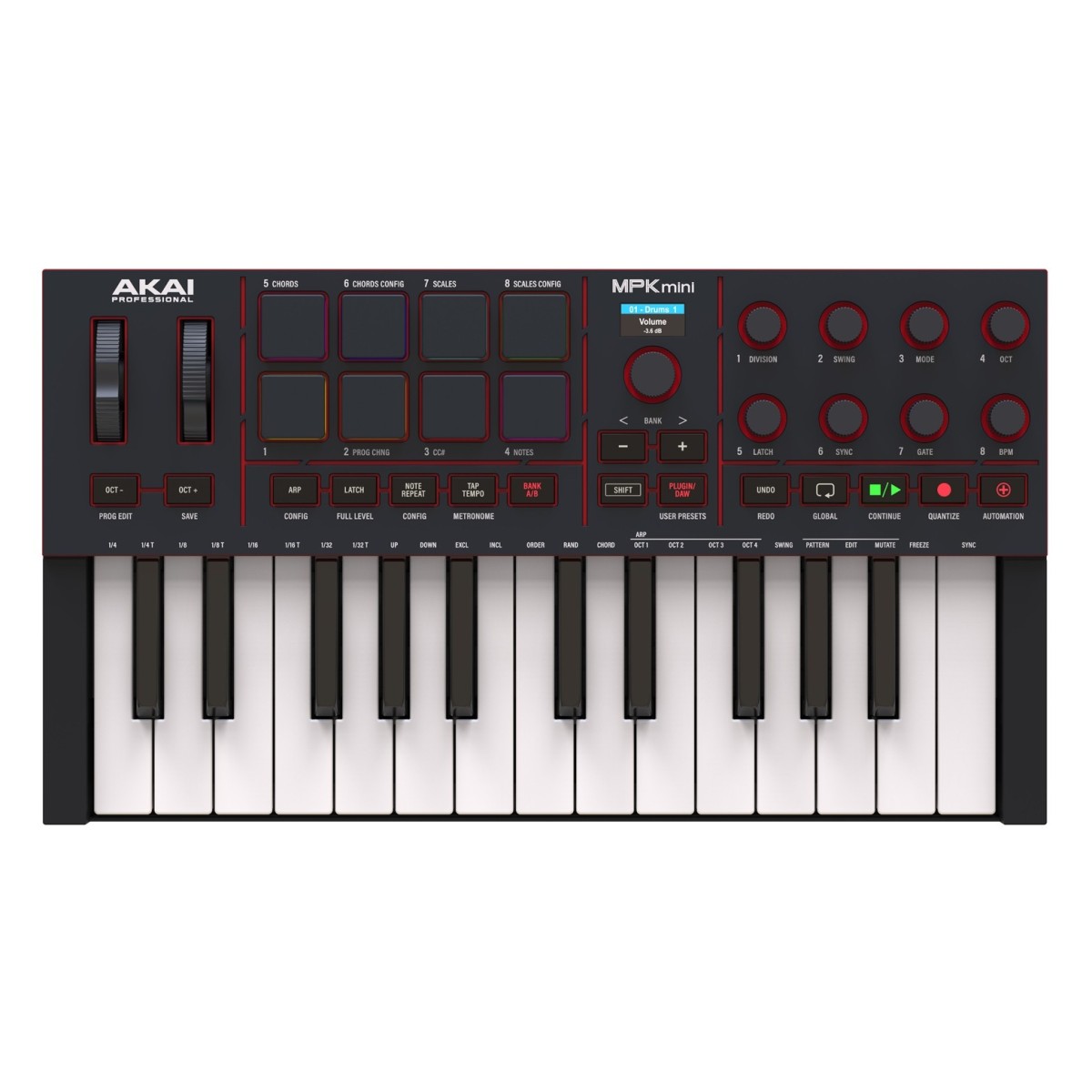
Akai Professional MPK Mini MK4 Compact MIDI Keyboard & Pad Controller Black MIDI Controller
The Akai Professional MPK Mini MK4 is built for producers beatmakers and musicians who need a compact controller that delivers full creative control without taking up space. It features a redesigned 25-key velocity-sensitive keybed that feels smooth and responsive making it easier to lay down melodies chords and basslines. Real pitch and modulation wheels give you accurate and hands-on control when performing or fine-tuning your sound. Eight RGB-backlit MPC pads respond to both velocity and pressure making them ideal for finger drumming sample triggering and clip launching. Each pad is highly responsive and can be assigned across two pad banks for more performance options. The MK4 also includes eight assignable rotary knobs an expanded transport section and a full-colour screen that gives you clear visual feedback as you work. The MPK Mini MK4 also comes with the Studio Instrument Collection a virtual instrument plugin featuring over one thousand studio-ready sounds from AIR Akai Pro and Moog. Built for expressive control in a compact form The MPK Mini MK4 features a redesigned keybed that responds naturally to your playing. With 25 velocity-sensitive keys and 10 octaves accessible through simple octave shift buttons you can cover a wide range of notes without a full-size keyboard. The addition of real mechanical pitch and modulation wheels gives you tactile hands-on control for bends modulation effects and more accurate performance input. You can shape your sounds with intent not just convenience. The RGB backlit MPC pads are velocity- and pressure-sensitive making them ideal for finger drumming or triggering samples. With two pad banks you can assign up to 16 pads giving you more options for layering and performance. This combination of expressive features in a compact unit makes the MK4 a strong choice for mobile producers and home studios alike. Flexible connectivity for modern and classic setups The MPK Mini MK4 includes both USB-C and a full-size 5-pin MIDI output giving you reliable connections to your computer and external gear. USB-C handles both power and data so you can plug directly into a laptop or tablet without extra cables or adapters. The MIDI output lets you control classic synthesisers grooveboxes or other MIDI-enabled instruments directly making the MK4 useful beyond a digital-only environment. This controller also includes a 1/4-inch input for a sustain pedal which adds another layer of expression for keyboard players. It is designed to slot into any setup and keeps things simple so you can focus on creating rather than troubleshooting connections. Software suite with 1000+ studio sounds included The MPK Mini MK4 comes with free access to the Studio Instrument Collection. This exclusive virtual instrument gives you over 1000 professionally crafted presets from leading software developers including AIR Akai Pro and Moog. These presets cover a wide range of sounds from vintage synths and basses to modern leads and keys making it easy to start building tracks straight out of the box.Because the MPK Mini MK4 offers pre-mapped controls you can browse and tweak presets directly from the controller. No mouse is needed. This keeps your workflow quick and your focus on music not navigating menus. Everything is designed to work together making it easy to stay inspired during your sessions. Creative tools that support musical exploration Several built-in performance tools help shape your ideas into finished pieces. Intelligent Scale and Chord modes allow you to play in key and build harmonies even if your keyboard skills are limited. These features help remove the guesswork when writing melodies or progressions and encourage more musical results without extra effort. An upgraded arpeggiator adds Pattern Freeze and Mutate functions. These give you more control over rhythmic variations and help generate new riffs or backing parts that evolve during your performance. Combined with the tight DAW integration these tools provide the building blocks you need to explore new sounds and arrangements. Features Updated expressive third-generation keyboard Full-colour display for real-time visual feedback and easy navigation Real pitch and modulation wheels for precision control Eight velocity- and pressure-sensitive RGB backlit MPC pads Eight assignable 360° rotary knobs for tactile sound-shaping Expanded transport controls for seamless DAW integration Scale and chord modes for effortless harmonic composition Enhanced arpeggiator with pattern freeze and mutate functions Includes studio instrument collection with over 1000 presets from AIR Akai Pro and Moog Pre-mapped scripts for Ableton Live Logic Pro FL Studio Bitwig and Cubase USB-C connectivity and full-size 5-pin MIDI output Includes Ableton Live Lite 12 licence plus free trials of Melodics and Splice Specifications Keys: 25 Velocity-Sensitive Keys 10-Octave Range With Octave Up/Down Buttons Pads: 8 Assignable RGB Backlit Pads Velocity- And Pressure-Sensitive 2 Banks Knobs: 8 Assignable 360° Knobs Controls: 1 Pitch Wheel 1 Mod Wheel 1 Navigation/Menu Encoder Transport Control Buttons Connections: 1 x USB-C Port 1 x 1/4″ TS Input For Sustain Pedal 1 x 5-Pin MIDI Output Port Power: USB Bus-Powered Dimensions (W x H x D): 13.68″ x 1.8″ x 7.56″ / 347.5mm x 45.7mm x 192mm Weight: 2.31 lbs / 1.05 kg Product Code: MPKMINI4B
-
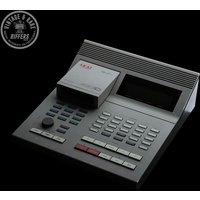
1990s Akai ASQ 10 Sequencer White used
This is a lovely example of a used Akai Sequencer available on Synth for Sale. Running the sought-after Vimana 3.15B5 by Mansell LabsOften referred to as the padless MPC60, the AKAI ASQ10 (Advanced Sequencer) is a legendary … Read More for more information and how to order. Running the sought-after Vimana 3.15B5 by Mansell LabsOften referred to as the padless MPC60, the AKAI ASQ10 (Advanced Sequencer) is a legendary …
-
Ableton Live 12 Suite,Upgrade from Live 12 Standard
NOTE: This is an upgrade, you will need to own an existing copy of Ableton 12 Standard Edition, please contact us if you’re unsure if you qualify.
Ableton Live has secured itself in the industry and is THE standard DAW for both studio use and live performance. The Prodigy, Skrillex, Rachel K Collier, Vicky O’Neon, Orbital and many more use live setups built around previous iterations of Ableton Live.
Performance, Studio, or both:
All DAWs share common areas, it can be hard to decide what’s best for you. Ableton’s speciality is that it fuses both the live environment and the studio environment together into one package. Clip and Session view share two roles. The Grid-based Clip view allows you to launch audio and midi clips however you choose, building up live performances and changing your sets at will, the Session view is your traditional left-to-right recording timeline. The two integrate seamlessly, allowing you to record your live set as you perform it, or maybe you have some ideas for a bassline? Clip view will let you audition your ideas and swap out components until you find the right one for your current session.
Hardware and effects:
If you have a range of hardware instruments, Live’s midi integration is crazy good, having the ability to control or be controlled by other equipment, you could run your entire session or live set via live, using it as the master sequencer and master effects processor, or hidden away as a brain to be controlled via your existing hardware to allow your existing hardware units to do even more than before!
Live LINK:
Live Link is a networking-based syncing system. This allows all units on the same WIFI network to send and receive tempo information + be linked to a master start-stop quantize. A prime example is if you’re running live and a friend joins your studio with a LINK-compatible device, once they’ve plugged in, they hit play and their unit will automatically sync to Live + Start in time, the bonus here though is if your friend wanted to change the tempo, with normal midi sequencing only the master could change the tempo, but LINK would allow your friend’s device to change the tempo and Live would adjust. Pure, unrestricted jamming.
Some examples of LINK-enabled devices include most KORG iOS and Desktop apps + Modern AKAI MPC hardware sequencers.What’s new in Live 12?
- MIDI Transformations and Generators:
Use MIDI Transformations to add ornaments and articulations, draw acceleration and deceleration curves, connect successive notes and chords, and simulate the strum of a guitar. Take advantage of MIDI Generators that let you conjure up playful and original ideas for you to develop and turn into your own. And go even further with advanced Max for Live Transformations and Generators. - Sound Similarity:
Start with a sample and tell Live’s browser to find comparable sounds and instrument or drum presets – with the help of a set of advanced machine-learning algorithms. Or use Sound Similarity to find and swap comparable samples in Simpler or Drum Rack. - New devices:
create everything from subtle and precise mastering-grade warmth to wild and unpredictable sound degradation with Roar, Live’s new saturation and colouring effect. Explore new textures and timbres with the twin sound engines of Meld. Or get even more expressive with the latest iteration of Robert Henke’s granular synthesis device, Granulator III. - Workflow improvements:
Stack Live’s Clip and Device Views to see more of what’s going on in your track at a glance. Use Live’s Mixer in Arrangement View to get more information and control without moving to Session View and breaking the flow. Discover new sounds and find them again more easily with the Browser’s new tagging system and search history. And freeze and flatten a track in just one step.
Key Features
- One of the industry’s best samplers:
Ableton Live has set the standards for time and pitch stretching and manipulating audio. Think of it as one giant sampler, by default, any audio is already set up and ready to go. - The best software for live performance:
Ableton Live doesn’t restrict you, it can adapt to how you want to perform, triggering drum samples or audio clips from your drumkit? It can help that, just need it for a setlist and selecting which instruments? Yup, controlling an entire modular rig? That too. Live fits around your workflow, not the other way around. - Hardware Royalty:
If you’re working with hardware like drum machines, samplers, synths and other sequencers, Live helps bridge everything together helping you bring your best ideas to life.
Specifications
- Operating System:
– Mac: macOS 11 Big Sur or later
– Windows: Windows 10 (version 22H2) or Windows 11 (version 22H2 and later) - Processor:
– Mac: Intel Core i5 or later, or Apple Silicon
– Windows: 5th Generation Intel Core i5 or AMD Multi-Core Processor. - Memory: 8GB Ram
- Display:
– Mac: 1280 x 800
– Windows: 1366 x 768 - Disk Space: 3Gb for basic installation (8GB recommended), up to 76GB for additional sound content.
- Software specifications:
– Amount of Audio + MIDI tracks: Unlimited
– Amount of Scenes: Unlimited
– Send + Return Tracks: 12
– Mono Input + Output capability: 256
– Software Instruments: 20
– Packs: 33
– Audio effects: 58
– MIDI Tools: 14
– MIDI Effects: 14
– Modulators: 6
- MIDI Transformations and Generators:
-
Ableton Live 12 Suite,Upgrade from Live 1-11 Standard
NOTE: This is an upgrade, you will need to own an existing copy of Ableton 1-11 Standard Edition, please contact us if you’re unsure if you qualify.
Ableton Live has secured itself in the industry and is THE standard DAW for both studio use and live performance. The Prodigy, Skrillex, Rachel K Collier, Vicky O’Neon, Orbital and many more use live setups built around previous iterations of Ableton Live.
Performance, Studio, or both:
All DAWs share common areas, it can be hard to decide what’s best for you. Ableton’s speciality is that it fuses both the live environment and the studio environment together into one package. Clip and Session view share two roles. The Grid-based Clip view allows you to launch audio and midi clips however you choose, building up live performances and changing your sets at will, the Session view is your traditional left-to-right recording timeline. The two integrate seamlessly, allowing you to record your live set as you perform it, or maybe you have some ideas for a bassline? Clip view will let you audition your ideas and swap out components until you find the right one for your current session.
Hardware and effects:
If you have a range of hardware instruments, Live’s midi integration is crazy good, having the ability to control or be controlled by other equipment, you could run your entire session or live set via live, using it as the master sequencer and master effects processor, or hidden away as a brain to be controlled via your existing hardware to allow your existing hardware units to do even more than before!
Live LINK:
Live Link is a networking-based syncing system. This allows all units on the same WIFI network to send and receive tempo information + be linked to a master start-stop quantize. A prime example is if you’re running live and a friend joins your studio with a LINK-compatible device, once they’ve plugged in, they hit play and their unit will automatically sync to Live + Start in time, the bonus here though is if your friend wanted to change the tempo, with normal midi sequencing only the master could change the tempo, but LINK would allow your friend’s device to change the tempo and Live would adjust. Pure, unrestricted jamming.
Some examples of LINK-enabled devices include most KORG iOS and Desktop apps + Modern AKAI MPC hardware sequencers.What’s new in Live 12?
- MIDI Transformations and Generators:
Use MIDI Transformations to add ornaments and articulations, draw acceleration and deceleration curves, connect successive notes and chords, and simulate the strum of a guitar. Take advantage of MIDI Generators that let you conjure up playful and original ideas for you to develop and turn into your own. And go even further with advanced Max for Live Transformations and Generators. - Sound Similarity:
Start with a sample and tell Live’s browser to find comparable sounds and instrument or drum presets – with the help of a set of advanced machine-learning algorithms. Or use Sound Similarity to find and swap comparable samples in Simpler or Drum Rack. - New devices:
create everything from subtle and precise mastering-grade warmth to wild and unpredictable sound degradation with Roar, Live’s new saturation and colouring effect. Explore new textures and timbres with the twin sound engines of Meld. Or get even more expressive with the latest iteration of Robert Henke’s granular synthesis device, Granulator III. - Workflow improvements:
Stack Live’s Clip and Device Views to see more of what’s going on in your track at a glance. Use Live’s Mixer in Arrangement View to get more information and control without moving to Session View and breaking the flow. Discover new sounds and find them again more easily with the Browser’s new tagging system and search history. And freeze and flatten a track in just one step.
Key Features
- One of the industry’s best samplers:
Ableton Live has set the standards for time and pitch stretching and manipulating audio. Think of it as one giant sampler, by default, any audio is already set up and ready to go. - The best software for live performance:
Ableton Live doesn’t restrict you, it can adapt to how you want to perform, triggering drum samples or audio clips from your drumkit? It can help that, just need it for a setlist and selecting which instruments? Yup, controlling an entire modular rig? That too. Live fits around your workflow, not the other way around. - Hardware Royalty:
If you’re working with hardware like drum machines, samplers, synths and other sequencers, Live helps bridge everything together helping you bring your best ideas to life.
Specifications
- Operating System:
– Mac: macOS 11 Big Sur or later
– Windows: Windows 10 (version 22H2) or Windows 11 (version 22H2 and later) - Processor:
– Mac: Intel Core i5 or later, or Apple Silicon
– Windows: 5th Generation Intel Core i5 or AMD Multi-Core Processor. - Memory: 8GB Ram
- Display:
– Mac: 1280 x 800
– Windows: 1366 x 768 - Disk Space: 3Gb for basic installation (8GB recommended), up to 76GB for additional sound content.
- Software specifications:
– Amount of Audio + MIDI tracks: Unlimited
– Amount of Scenes: Unlimited
– Send + Return Tracks: 12
– Mono Input + Output capability: 256
– Software Instruments: 20
– Packs: 33
– Audio effects: 58
– MIDI Tools: 14
– MIDI Effects: 14
– Modulators: 6
- MIDI Transformations and Generators:
-
Ableton Live 12 Standard,Upgrade from Live 1-11 Standard
NOTE: This is an upgrade, you will need to own an existing copy of Ableton Live 1-11 Standard Edition, please contact us if you’re unsure if you qualify.
Ableton Live has secured itself in the industry and is THE standard DAW for both studio use and live performance. The Prodigy, Skrillex, Rachel K Collier, Vicky O’Neon, Orbital and many more use live setups built around previous iterations of Ableton Live.
Performance, Studio, or both:
All DAWs share common areas, it can be hard to decide what’s best for you. Ableton’s speciality is that it fuses both the live environment and the studio environment together into one package. Clip and Session view share two roles. The Grid-based Clip view allows you to launch audio and midi clips however you choose, building up live performances and changing your sets at will, the Session view is your traditional left-to-right recording timeline. The two integrate seamlessly, allowing you to record your live set as you perform it, or maybe you have some ideas for a bassline? Clip view will let you audition your ideas and swap out components until you find the right one for your current session.
Hardware and effects:
If you have a range of hardware instruments, Live’s midi integration is crazy good, having the ability to control or be controlled by other equipment, you could run your entire session or live set via live, using it as the master sequencer and master effects processor, or hidden away as a brain to be controlled via your existing hardware to allow your existing hardware units to do even more than before!
Live LINK:
Live Link is a networking-based syncing system. This allows all units on the same WIFI network to send and receive tempo information + be linked to a master start-stop quantize. A prime example is if you’re running live and a friend joins your studio with a LINK-compatible device, once they’ve plugged in, they hit play and their unit will automatically sync to Live + Start in time, the bonus here though is if your friend wanted to change the tempo, with normal midi sequencing only the master could change the tempo, but LINK would allow your friend’s device to change the tempo and Live would adjust. Pure, unrestricted jamming.
Some examples of LINK-enabled devices include most KORG iOS and Desktop apps + Modern AKAI MPC hardware sequencers.What’s new in Live 12?
- MIDI Transformations and Generators:
Use MIDI Transformations to add ornaments and articulations, draw acceleration and deceleration curves, connect successive notes and chords, and simulate the strum of a guitar. Take advantage of MIDI Generators that let you conjure up playful and original ideas for you to develop and turn into your own. And go even further with advanced Max for Live Transformations and Generators. - Sound Similarity:
Start with a sample and tell Live’s browser to find comparable sounds and instrument or drum presets – with the help of a set of advanced machine-learning algorithms. Or use Sound Similarity to find and swap comparable samples in Simpler or Drum Rack. - New devices:
create everything from subtle and precise mastering-grade warmth to wild and unpredictable sound degradation with Roar, Live’s new saturation and colouring effect. Explore new textures and timbres with the twin sound engines of Meld. Or get even more expressive with the latest iteration of Robert Henke’s granular synthesis device, Granulator III. - Workflow improvements:
Stack Live’s Clip and Device Views to see more of what’s going on in your track at a glance. Use Live’s Mixer in Arrangement View to get more information and control without moving to Session View and breaking the flow. Discover new sounds and find them again more easily with the Browser’s new tagging system and search history. And freeze and flatten a track in just one step.
Key Features
- One of the industry’s best samplers:
Ableton Live has set the standards for time and pitch stretching and manipulating audio. Think of it as one giant sampler, by default, any audio is already set up and ready to go. - The best software for live performance:
Ableton Live doesn’t restrict you, it can adapt to how you want to perform, triggering drum samples or audio clips from your drumkit? It can help that, just need it for a setlist and selecting which instruments? Yup, controlling an entire modular rig? That too. Live fits around your workflow, not the other way around. - Hardware Royalty:
If you’re working with hardware like drum machines, samplers, synths and other sequencers, Live helps bridge everything together helping you bring your best ideas to life.
Specifications
- Operating System:
– Mac: macOS 11 Big Sur or later
– Windows: Windows 10 (version 22H2) or Windows 11 (version 22H2 and later) - Processor:
– Mac: Intel Core i5 or later, or Apple Silicon
– Windows: 5th Generation Intel Core i5 or AMD Multi-Core Processor. - Memory: 8GB Ram
- Display:
– Mac: 1280 x 800
– Windows: 1366 x 768 - Disk Space: 3Gb for basic installation (8GB recommended), up to 76GB for additional sound content.
- Software specifications:
– Amount of Audio + MIDI tracks: Unlimited
– Amount of Scenes: Unlimited
– Send + Return Tracks: 12
– Mono Input + Output capability: 256
– Software Instruments: 13
– Packs: 16
– Audio effects: 42
– MIDI Tools: 14
– MIDI Effects: 13
– Modulators: 6
- MIDI Transformations and Generators:
-
Ableton Live 12 Standard,Upgrade from Live Intro
NOTE: This is an upgrade, you will need to own an existing copy of Ableton Live Intro, please contact us if you’re unsure if you qualify.
Ableton Live has secured itself in the industry and is THE standard DAW for both studio use and live performance. The Prodigy, Skrillex, Rachel K Collier, Vicky O’Neon, Orbital and many more use live setups built around previous iterations of Ableton Live.
Performance, Studio, or both:
All DAWs share common areas, it can be hard to decide what’s best for you. Ableton’s speciality is that it fuses both the live environment and the studio environment together into one package. Clip and Session view share two roles. The Grid-based Clip view allows you to launch audio and midi clips however you choose, building up live performances and changing your sets at will, the Session view is your traditional left-to-right recording timeline. The two integrate seamlessly, allowing you to record your live set as you perform it, or maybe you have some ideas for a bassline? Clip view will let you audition your ideas and swap out components until you find the right one for your current session.
Hardware and effects:
If you have a range of hardware instruments, Live’s midi integration is crazy good, having the ability to control or be controlled by other equipment, you could run your entire session or live set via live, using it as the master sequencer and master effects processor, or hidden away as a brain to be controlled via your existing hardware to allow your existing hardware units to do even more than before!
Live LINK:
Live Link is a networking-based syncing system. This allows all units on the same WIFI network to send and receive tempo information + be linked to a master start-stop quantize. A prime example is if you’re running live and a friend joins your studio with a LINK-compatible device, once they’ve plugged in, they hit play and their unit will automatically sync to Live + Start in time, the bonus here though is if your friend wanted to change the tempo, with normal midi sequencing only the master could change the tempo, but LINK would allow your friend’s device to change the tempo and Live would adjust. Pure, unrestricted jamming.
Some examples of LINK-enabled devices include most KORG iOS and Desktop apps + Modern AKAI MPC hardware sequencers.What’s new in Live 12?
- MIDI Transformations and Generators:
Use MIDI Transformations to add ornaments and articulations, draw acceleration and deceleration curves, connect successive notes and chords, and simulate the strum of a guitar. Take advantage of MIDI Generators that let you conjure up playful and original ideas for you to develop and turn into your own. And go even further with advanced Max for Live Transformations and Generators. - Sound Similarity:
Start with a sample and tell Live’s browser to find comparable sounds and instrument or drum presets – with the help of a set of advanced machine-learning algorithms. Or use Sound Similarity to find and swap comparable samples in Simpler or Drum Rack. - New devices:
create everything from subtle and precise mastering-grade warmth to wild and unpredictable sound degradation with Roar, Live’s new saturation and colouring effect. Explore new textures and timbres with the twin sound engines of Meld. Or get even more expressive with the latest iteration of Robert Henke’s granular synthesis device, Granulator III. - Workflow improvements:
Stack Live’s Clip and Device Views to see more of what’s going on in your track at a glance. Use Live’s Mixer in Arrangement View to get more information and control without moving to Session View and breaking the flow. Discover new sounds and find them again more easily with the Browser’s new tagging system and search history. And freeze and flatten a track in just one step.
Key Features
- One of the industry’s best samplers:
Ableton Live has set the standards for time and pitch stretching and manipulating audio. Think of it as one giant sampler, by default, any audio is already set up and ready to go. - The best software for live performance:
Ableton Live doesn’t restrict you, it can adapt to how you want to perform, triggering drum samples or audio clips from your drumkit? It can help that, just need it for a setlist and selecting which instruments? Yup, controlling an entire modular rig? That too. Live fits around your workflow, not the other way around. - Hardware Royalty:
If you’re working with hardware like drum machines, samplers, synths and other sequencers, Live helps bridge everything together helping you bring your best ideas to life.
Specifications
- Operating System:
– Mac: macOS 11 Big Sur or later
– Windows: Windows 10 (version 22H2) or Windows 11 (version 22H2 and later) - Processor:
– Mac: Intel Core i5 or later, or Apple Silicon
– Windows: 5th Generation Intel Core i5 or AMD Multi-Core Processor. - Memory: 8GB Ram
- Display:
– Mac: 1280 x 800
– Windows: 1366 x 768 - Disk Space: 3Gb for basic installation (8GB recommended), up to 76GB for additional sound content.
- Software specifications:
– Amount of Audio + MIDI tracks: Unlimited
– Amount of Scenes: Unlimited
– Send + Return Tracks: 12
– Mono Input + Output capability: 256
– Software Instruments: 13
– Packs: 16
– Audio effects: 42
– MIDI Tools: 14
– MIDI Effects: 13
– Modulators: 6
- MIDI Transformations and Generators:
-
Ableton Live 12 Suite,Upgrade from Live Intro
NOTE: This is an upgrade, you will need to own an existing copy of Ableton Live Intro, please contact us if you’re unsure if you qualify.
Ableton Live has secured itself in the industry and is THE standard DAW for both studio use and live performance. The Prodigy, Skrillex, Rachel K Collier, Vicky O’Neon, Orbital and many more use live setups built around previous iterations of Ableton Live.
Performance, Studio, or both:
All DAWs share common areas, it can be hard to decide what’s best for you. Ableton’s speciality is that it fuses both the live environment and the studio environment together into one package. Clip and Session view share two roles. The Grid-based Clip view allows you to launch audio and midi clips however you choose, building up live performances and changing your sets at will, the Session view is your traditional left-to-right recording timeline. The two integrate seamlessly, allowing you to record your live set as you perform it, or maybe you have some ideas for a bassline? Clip view will let you audition your ideas and swap out components until you find the right one for your current session.
Hardware and effects:
If you have a range of hardware instruments, Live’s midi integration is crazy good, having the ability to control or be controlled by other equipment, you could run your entire session or live set via live, using it as the master sequencer and master effects processor, or hidden away as a brain to be controlled via your existing hardware to allow your existing hardware units to do even more than before!
Live LINK:
Live Link is a networking-based syncing system. This allows all units on the same WIFI network to send and receive tempo information + be linked to a master start-stop quantize. A prime example is if you’re running live and a friend joins your studio with a LINK-compatible device, once they’ve plugged in, they hit play and their unit will automatically sync to Live + Start in time, the bonus here though is if your friend wanted to change the tempo, with normal midi sequencing only the master could change the tempo, but LINK would allow your friend’s device to change the tempo and Live would adjust. Pure, unrestricted jamming.
Some examples of LINK-enabled devices include most KORG iOS and Desktop apps + Modern AKAI MPC hardware sequencers.What’s new in Live 12?
- MIDI Transformations and Generators:
Use MIDI Transformations to add ornaments and articulations, draw acceleration and deceleration curves, connect successive notes and chords, and simulate the strum of a guitar. Take advantage of MIDI Generators that let you conjure up playful and original ideas for you to develop and turn into your own. And go even further with advanced Max for Live Transformations and Generators. - Sound Similarity:
Start with a sample and tell Live’s browser to find comparable sounds and instrument or drum presets – with the help of a set of advanced machine-learning algorithms. Or use Sound Similarity to find and swap comparable samples in Simpler or Drum Rack. - New devices:
create everything from subtle and precise mastering-grade warmth to wild and unpredictable sound degradation with Roar, Live’s new saturation and colouring effect. Explore new textures and timbres with the twin sound engines of Meld. Or get even more expressive with the latest iteration of Robert Henke’s granular synthesis device, Granulator III. - Workflow improvements:
Stack Live’s Clip and Device Views to see more of what’s going on in your track at a glance. Use Live’s Mixer in Arrangement View to get more information and control without moving to Session View and breaking the flow. Discover new sounds and find them again more easily with the Browser’s new tagging system and search history. And freeze and flatten a track in just one step.
Key Features
- One of the industry’s best samplers:
Ableton Live has set the standards for time and pitch stretching and manipulating audio. Think of it as one giant sampler, by default, any audio is already set up and ready to go. - The best software for live performance:
Ableton Live doesn’t restrict you, it can adapt to how you want to perform, triggering drum samples or audio clips from your drumkit? It can help that, just need it for a setlist and selecting which instruments? Yup, controlling an entire modular rig? That too. Live fits around your workflow, not the other way around. - Hardware Royalty:
If you’re working with hardware like drum machines, samplers, synths and other sequencers, Live helps bridge everything together helping you bring your best ideas to life.
Specifications
- Operating System:
– Mac: macOS 11 Big Sur or later
– Windows: Windows 10 (version 22H2) or Windows 11 (version 22H2 and later) - Processor:
– Mac: Intel Core i5 or later, or Apple Silicon
– Windows: 5th Generation Intel Core i5 or AMD Multi-Core Processor. - Memory: 8GB Ram
- Display:
– Mac: 1280 x 800
– Windows: 1366 x 768 - Disk Space: 3Gb for basic installation (8GB recommended), up to 76GB for additional sound content.
- Software specifications:
– Amount of Audio + MIDI tracks: Unlimited
– Amount of Scenes: Unlimited
– Send + Return Tracks: 12
– Mono Input + Output capability: 256
– Software Instruments: 20
– Packs: 33
– Audio effects: 58
– MIDI Tools: 14
– MIDI Effects: 14
– Modulators: 6
- MIDI Transformations and Generators: