Search results for: “Akai Tom Cat”

  • Native Instruments Cloud Supply MPC Edition

    Allow Synth for Sale to introduce you to this Native Instruments Cloud Supply MPC Edition

    MPC Editions have been developed from Native Instruments’ renowned Play Series, reimagined and tailored specifically for Akai Pro MPC hardware. Designed for seamless integration, these instruments provide exceptional sound quality in an intuitive, easy-to-use format, ensuring a fluid and inspiring music production experience.

    Each MPC Edition offers a unique sonic character with a diverse range of professionally designed presets. Whether you are crafting cinematic textures, deep basslines, lush pads, or cutting leads, these instruments deliver high-quality sounds to enhance your workflow. Unlike traditional sample packs, MPC Editions feature intelligently mapped controls, allowing effortless tweaking and customisation of sounds directly from your hardware.

    Optimised for performance and playability, MPC Editions enable users to shape, manipulate, and layer sounds with ease, unlocking new levels of expressiveness. Whether you are a seasoned producer or new to MPC hardware, these instruments provide a powerful and inspiring set of tools. Experience the best of NI’s Play Series in a format designed specifically for the legendary MPC workflow.

    Key Features:

    • Seamless MPC Integration:
      Designed exclusively for Akai Pro MPC hardware, ensuring smooth operation and intuitive control over sound manipulation.
    • High-Quality Presets:
      Includes a wide selection of professionally crafted presets, offering everything from vintage synth sounds to deep basses and atmospheric pads.
    • Hands-On Sound Design:
      Easily tweak and customise presets using intelligently mapped controls, providing a responsive and engaging music-making experience.

    Cloud Supply MPC Edition:

    Cloud Supply MPC Edition is a specialized instrument for hazy trap hooks and smoke-soaked atmospherics packed with 111 presets for contemporary production. It’s dripping with beat-ready hybrid keys, wavy pads, plucks, bells, and sequences, plus pitch-shifted resampling for on-point hidden harmonics – all refined through analog studio gear and high-end processing. Plus, there’s plenty of powerful tweaking options to dial in your own sounds.

    Installation Instructions:

    Installing your MPC Edition is quick and simple. Ensure your MPC hardware is connected to Wi-Fi, then follow these steps:

    • Log into your inMusic Profile on your MPC.
    • Go to Preferences > Activations.
    • Press “ENTER SERIAL”, input your serial number, and press “REGISTER”.
    • Press the download button next to your plugin in the Activations tab to wirelessly install and activate.

    System Requirements:

    To ensure compatibility, your system must meet the following requirements:

    • Standalone MPC firmware version 3.4 or above.
    • Compatible with MPC Key 37, MPC One+, MPC X Special Edition, MPC Key 61, MPC One, MPC Live II, MPC X, and MPC Live hardware.

    Specifications:

    • Developed from Native Instruments’ Play Series.
    • Custom-built for seamless integration with Akai Pro MPC hardware.
    • 141 professionally designed presets in Analog Dreams MPC Edition.
    • Vintage synth sounds combined with modern creative effects.
    • Hands-on controls for real-time sound manipulation.
    • Simple Wi-Fi-based installation and activation process.
    • Optimised for standalone MPC devices running firmware 3.4 or above.
  • Native Instruments Homage MPC Edition

    Allow Synth for Sale to introduce you to this Native Instruments Homage MPC Edition

    MPC Editions have been developed from Native Instruments’ renowned Play Series, reimagined and tailored specifically for Akai Pro MPC hardware. Designed for seamless integration, these instruments provide exceptional sound quality in an intuitive, easy-to-use format, ensuring a fluid and inspiring music production experience.

    Each MPC Edition offers a unique sonic character with a diverse range of professionally designed presets. Whether you are crafting cinematic textures, deep basslines, lush pads, or cutting leads, these instruments deliver high-quality sounds to enhance your workflow. Unlike traditional sample packs, MPC Editions feature intelligently mapped controls, allowing effortless tweaking and customisation of sounds directly from your hardware.

    Optimised for performance and playability, MPC Editions enable users to shape, manipulate, and layer sounds with ease, unlocking new levels of expressiveness. Whether you are a seasoned producer or new to MPC hardware, these instruments provide a powerful and inspiring set of tools. Experience the best of NI’s Play Series in a format designed specifically for the legendary MPC workflow.

    Key Features:

    • Seamless MPC Integration:
      Designed exclusively for Akai Pro MPC hardware, ensuring smooth operation and intuitive control over sound manipulation.
    • High-Quality Presets:
      Includes a wide selection of professionally crafted presets, offering everything from vintage synth sounds to deep basses and atmospheric pads.
    • Hands-On Sound Design:
      Easily tweak and customise presets using intelligently mapped controls, providing a responsive and engaging music-making experience.

    Nacht MPC Edition:

    Homage MPC Edition pays tribute to the adventurous spirit of the LA beat scene with 100 customizable presets of warped melodics and distorted textures packed into a hands-on Play Series instrument. Infuse lo-fi samples into your tracks with saturated synths, keys, guitars, basses, and more. Find your favorite sounds and experiment layering them with noise samples to add instant character to boundary-pushing hip hop productions of all kinds.

    Installation Instructions:

    Installing your MPC Edition is quick and simple. Ensure your MPC hardware is connected to Wi-Fi, then follow these steps:

    • Log into your inMusic Profile on your MPC.
    • Go to Preferences > Activations.
    • Press “ENTER SERIAL”, input your serial number, and press “REGISTER”.
    • Press the download button next to your plugin in the Activations tab to wirelessly install and activate.

    System Requirements:

    To ensure compatibility, your system must meet the following requirements:

    • Standalone MPC firmware version 3.4 or above.
    • Compatible with MPC Key 37, MPC One+, MPC X Special Edition, MPC Key 61, MPC One, MPC Live II, MPC X, and MPC Live hardware.

    Specifications:

    • Developed from Native Instruments’ Play Series.
    • Custom-built for seamless integration with Akai Pro MPC hardware.
    • 141 professionally designed presets in Analog Dreams MPC Edition.
    • Vintage synth sounds combined with modern creative effects.
    • Hands-on controls for real-time sound manipulation.
    • Simple Wi-Fi-based installation and activation process.
    • Optimised for standalone MPC devices running firmware 3.4 or above.
  • Ableton Live 12 Suite,Upgrade from Live 12 Standard

    Ableton Live 12 Suite,Upgrade from Live 12 Standard

    Allow Synth for Sale to introduce you to this Ableton Live 12 Suite,Upgrade from Live 12 Standard

    NOTE: This is an upgrade, you will need to own an existing copy of Ableton 12 Standard Edition, please contact us if you’re unsure if you qualify.

    Ableton Live has secured itself in the industry and is THE standard DAW for both studio use and live performance. The Prodigy, Skrillex, Rachel K Collier, Vicky O’Neon, Orbital and many more use live setups built around previous iterations of Ableton Live.

    Performance, Studio, or both:

    All DAWs share common areas, it can be hard to decide what’s best for you. Ableton’s speciality is that it fuses both the live environment and the studio environment together into one package. Clip and Session view share two roles. The Grid-based Clip view allows you to launch audio and midi clips however you choose, building up live performances and changing your sets at will, the Session view is your traditional left-to-right recording timeline. The two integrate seamlessly, allowing you to record your live set as you perform it, or maybe you have some ideas for a bassline? Clip view will let you audition your ideas and swap out components until you find the right one for your current session.

    Hardware and effects:

    If you have a range of hardware instruments, Live’s midi integration is crazy good, having the ability to control or be controlled by other equipment, you could run your entire session or live set via live, using it as the master sequencer and master effects processor, or hidden away as a brain to be controlled via your existing hardware to allow your existing hardware units to do even more than before!

    Live LINK:

    Live Link is a networking-based syncing system. This allows all units on the same WIFI network to send and receive tempo information + be linked to a master start-stop quantize. A prime example is if you’re running live and a friend joins your studio with a LINK-compatible device, once they’ve plugged in, they hit play and their unit will automatically sync to Live + Start in time, the bonus here though is if your friend wanted to change the tempo, with normal midi sequencing only the master could change the tempo, but LINK would allow your friend’s device to change the tempo and Live would adjust. Pure, unrestricted jamming.
    Some examples of LINK-enabled devices include most KORG iOS and Desktop apps + Modern AKAI MPC hardware sequencers.

    What’s new in Live 12?

    • MIDI Transformations and Generators:
      Use MIDI Transformations to add ornaments and articulations, draw acceleration and deceleration curves, connect successive notes and chords, and simulate the strum of a guitar. Take advantage of MIDI Generators that let you conjure up playful and original ideas for you to develop and turn into your own. And go even further with advanced Max for Live Transformations and Generators.
    • Sound Similarity:
      Start with a sample and tell Live’s browser to find comparable sounds and instrument or drum presets – with the help of a set of advanced machine-learning algorithms. Or use Sound Similarity to find and swap comparable samples in Simpler or Drum Rack.
    • New devices:
      create everything from subtle and precise mastering-grade warmth to wild and unpredictable sound degradation with Roar, Live’s new saturation and colouring effect. Explore new textures and timbres with the twin sound engines of Meld. Or get even more expressive with the latest iteration of Robert Henke’s granular synthesis device, Granulator III.
    • Workflow improvements:
      Stack Live’s Clip and Device Views to see more of what’s going on in your track at a glance. Use Live’s Mixer in Arrangement View to get more information and control without moving to Session View and breaking the flow. Discover new sounds and find them again more easily with the Browser’s new tagging system and search history. And freeze and flatten a track in just one step.

    Key Features

    • One of the industry’s best samplers:
      Ableton Live has set the standards for time and pitch stretching and manipulating audio. Think of it as one giant sampler, by default, any audio is already set up and ready to go.
    • The best software for live performance:
      Ableton Live doesn’t restrict you, it can adapt to how you want to perform, triggering drum samples or audio clips from your drumkit? It can help that, just need it for a setlist and selecting which instruments? Yup, controlling an entire modular rig? That too. Live fits around your workflow, not the other way around.
    • Hardware Royalty:
      If you’re working with hardware like drum machines, samplers, synths and other sequencers, Live helps bridge everything together helping you bring your best ideas to life.

    Specifications

    • Operating System:
      – Mac: macOS 11 Big Sur or later
      – Windows: Windows 10 (version 22H2) or Windows 11 (version 22H2 and later)
    • Processor:
      – Mac: Intel Core i5 or later, or Apple Silicon
      – Windows: 5th Generation Intel Core i5 or AMD Multi-Core Processor.
    • Memory: 8GB Ram
    • Display:
      – Mac: 1280 x 800
      – Windows: 1366 x 768
    • Disk Space: 3Gb for basic installation (8GB recommended), up to 76GB for additional sound content.
    • Software specifications: 
      – Amount of Audio + MIDI tracks: Unlimited
      – Amount of Scenes: Unlimited
      – Send + Return Tracks: 12
      – Mono Input + Output capability: 256
      – Software Instruments: 20
      – Packs: 33
      – Audio effects: 58
      – MIDI Tools: 14
      – MIDI Effects: 14
      – Modulators: 6
  • Ableton Live 12 Suite,Upgrade from Live 1-11 Standard

    Ableton Live 12 Suite,Upgrade from Live 1-11 Standard

    Allow Synth for Sale to introduce you to this Ableton Live 12 Suite,Upgrade from Live 1-11 Standard

    NOTE: This is an upgrade, you will need to own an existing copy of Ableton 1-11 Standard Edition, please contact us if you’re unsure if you qualify.

    Ableton Live has secured itself in the industry and is THE standard DAW for both studio use and live performance. The Prodigy, Skrillex, Rachel K Collier, Vicky O’Neon, Orbital and many more use live setups built around previous iterations of Ableton Live.

    Performance, Studio, or both:

    All DAWs share common areas, it can be hard to decide what’s best for you. Ableton’s speciality is that it fuses both the live environment and the studio environment together into one package. Clip and Session view share two roles. The Grid-based Clip view allows you to launch audio and midi clips however you choose, building up live performances and changing your sets at will, the Session view is your traditional left-to-right recording timeline. The two integrate seamlessly, allowing you to record your live set as you perform it, or maybe you have some ideas for a bassline? Clip view will let you audition your ideas and swap out components until you find the right one for your current session.

    Hardware and effects:

    If you have a range of hardware instruments, Live’s midi integration is crazy good, having the ability to control or be controlled by other equipment, you could run your entire session or live set via live, using it as the master sequencer and master effects processor, or hidden away as a brain to be controlled via your existing hardware to allow your existing hardware units to do even more than before!

    Live LINK:

    Live Link is a networking-based syncing system. This allows all units on the same WIFI network to send and receive tempo information + be linked to a master start-stop quantize. A prime example is if you’re running live and a friend joins your studio with a LINK-compatible device, once they’ve plugged in, they hit play and their unit will automatically sync to Live + Start in time, the bonus here though is if your friend wanted to change the tempo, with normal midi sequencing only the master could change the tempo, but LINK would allow your friend’s device to change the tempo and Live would adjust. Pure, unrestricted jamming.
    Some examples of LINK-enabled devices include most KORG iOS and Desktop apps + Modern AKAI MPC hardware sequencers.

    What’s new in Live 12?

    • MIDI Transformations and Generators:
      Use MIDI Transformations to add ornaments and articulations, draw acceleration and deceleration curves, connect successive notes and chords, and simulate the strum of a guitar. Take advantage of MIDI Generators that let you conjure up playful and original ideas for you to develop and turn into your own. And go even further with advanced Max for Live Transformations and Generators.
    • Sound Similarity:
      Start with a sample and tell Live’s browser to find comparable sounds and instrument or drum presets – with the help of a set of advanced machine-learning algorithms. Or use Sound Similarity to find and swap comparable samples in Simpler or Drum Rack.
    • New devices:
      create everything from subtle and precise mastering-grade warmth to wild and unpredictable sound degradation with Roar, Live’s new saturation and colouring effect. Explore new textures and timbres with the twin sound engines of Meld. Or get even more expressive with the latest iteration of Robert Henke’s granular synthesis device, Granulator III.
    • Workflow improvements:
      Stack Live’s Clip and Device Views to see more of what’s going on in your track at a glance. Use Live’s Mixer in Arrangement View to get more information and control without moving to Session View and breaking the flow. Discover new sounds and find them again more easily with the Browser’s new tagging system and search history. And freeze and flatten a track in just one step.

    Key Features

    • One of the industry’s best samplers:
      Ableton Live has set the standards for time and pitch stretching and manipulating audio. Think of it as one giant sampler, by default, any audio is already set up and ready to go.
    • The best software for live performance:
      Ableton Live doesn’t restrict you, it can adapt to how you want to perform, triggering drum samples or audio clips from your drumkit? It can help that, just need it for a setlist and selecting which instruments? Yup, controlling an entire modular rig? That too. Live fits around your workflow, not the other way around.
    • Hardware Royalty:
      If you’re working with hardware like drum machines, samplers, synths and other sequencers, Live helps bridge everything together helping you bring your best ideas to life.

    Specifications

    • Operating System:
      – Mac: macOS 11 Big Sur or later
      – Windows: Windows 10 (version 22H2) or Windows 11 (version 22H2 and later)
    • Processor:
      – Mac: Intel Core i5 or later, or Apple Silicon
      – Windows: 5th Generation Intel Core i5 or AMD Multi-Core Processor.
    • Memory: 8GB Ram
    • Display:
      – Mac: 1280 x 800
      – Windows: 1366 x 768
    • Disk Space: 3Gb for basic installation (8GB recommended), up to 76GB for additional sound content.
    • Software specifications: 
      – Amount of Audio + MIDI tracks: Unlimited
      – Amount of Scenes: Unlimited
      – Send + Return Tracks: 12
      – Mono Input + Output capability: 256
      – Software Instruments: 20
      – Packs: 33
      – Audio effects: 58
      – MIDI Tools: 14
      – MIDI Effects: 14
      – Modulators: 6
  • Ableton Live 12 Standard,Upgrade from Live 1-11 Standard

    Ableton Live 12 Standard,Upgrade from Live 1-11 Standard

    Allow Synth for Sale to introduce you to this Ableton Live 12 Standard,Upgrade from Live 1-11 Standard

    NOTE: This is an upgrade, you will need to own an existing copy of Ableton Live 1-11 Standard Edition, please contact us if you’re unsure if you qualify.

    Ableton Live has secured itself in the industry and is THE standard DAW for both studio use and live performance. The Prodigy, Skrillex, Rachel K Collier, Vicky O’Neon, Orbital and many more use live setups built around previous iterations of Ableton Live.

    Performance, Studio, or both:

    All DAWs share common areas, it can be hard to decide what’s best for you. Ableton’s speciality is that it fuses both the live environment and the studio environment together into one package. Clip and Session view share two roles. The Grid-based Clip view allows you to launch audio and midi clips however you choose, building up live performances and changing your sets at will, the Session view is your traditional left-to-right recording timeline. The two integrate seamlessly, allowing you to record your live set as you perform it, or maybe you have some ideas for a bassline? Clip view will let you audition your ideas and swap out components until you find the right one for your current session.

    Hardware and effects:

    If you have a range of hardware instruments, Live’s midi integration is crazy good, having the ability to control or be controlled by other equipment, you could run your entire session or live set via live, using it as the master sequencer and master effects processor, or hidden away as a brain to be controlled via your existing hardware to allow your existing hardware units to do even more than before!

    Live LINK:

    Live Link is a networking-based syncing system. This allows all units on the same WIFI network to send and receive tempo information + be linked to a master start-stop quantize. A prime example is if you’re running live and a friend joins your studio with a LINK-compatible device, once they’ve plugged in, they hit play and their unit will automatically sync to Live + Start in time, the bonus here though is if your friend wanted to change the tempo, with normal midi sequencing only the master could change the tempo, but LINK would allow your friend’s device to change the tempo and Live would adjust. Pure, unrestricted jamming.
    Some examples of LINK-enabled devices include most KORG iOS and Desktop apps + Modern AKAI MPC hardware sequencers.

    What’s new in Live 12?

    • MIDI Transformations and Generators:
      Use MIDI Transformations to add ornaments and articulations, draw acceleration and deceleration curves, connect successive notes and chords, and simulate the strum of a guitar. Take advantage of MIDI Generators that let you conjure up playful and original ideas for you to develop and turn into your own. And go even further with advanced Max for Live Transformations and Generators.
    • Sound Similarity:
      Start with a sample and tell Live’s browser to find comparable sounds and instrument or drum presets – with the help of a set of advanced machine-learning algorithms. Or use Sound Similarity to find and swap comparable samples in Simpler or Drum Rack.
    • New devices:
      create everything from subtle and precise mastering-grade warmth to wild and unpredictable sound degradation with Roar, Live’s new saturation and colouring effect. Explore new textures and timbres with the twin sound engines of Meld. Or get even more expressive with the latest iteration of Robert Henke’s granular synthesis device, Granulator III.
    • Workflow improvements:
      Stack Live’s Clip and Device Views to see more of what’s going on in your track at a glance. Use Live’s Mixer in Arrangement View to get more information and control without moving to Session View and breaking the flow. Discover new sounds and find them again more easily with the Browser’s new tagging system and search history. And freeze and flatten a track in just one step.

    Key Features

    • One of the industry’s best samplers:
      Ableton Live has set the standards for time and pitch stretching and manipulating audio. Think of it as one giant sampler, by default, any audio is already set up and ready to go.
    • The best software for live performance:
      Ableton Live doesn’t restrict you, it can adapt to how you want to perform, triggering drum samples or audio clips from your drumkit? It can help that, just need it for a setlist and selecting which instruments? Yup, controlling an entire modular rig? That too. Live fits around your workflow, not the other way around.
    • Hardware Royalty:
      If you’re working with hardware like drum machines, samplers, synths and other sequencers, Live helps bridge everything together helping you bring your best ideas to life.

    Specifications

    • Operating System:
      – Mac: macOS 11 Big Sur or later
      – Windows: Windows 10 (version 22H2) or Windows 11 (version 22H2 and later)
    • Processor:
      – Mac: Intel Core i5 or later, or Apple Silicon
      – Windows: 5th Generation Intel Core i5 or AMD Multi-Core Processor.
    • Memory: 8GB Ram
    • Display:
      – Mac: 1280 x 800
      – Windows: 1366 x 768
    • Disk Space: 3Gb for basic installation (8GB recommended), up to 76GB for additional sound content.
    • Software specifications: 
      – Amount of Audio + MIDI tracks: Unlimited
      – Amount of Scenes: Unlimited
      – Send + Return Tracks: 12
      – Mono Input + Output capability: 256
      – Software Instruments: 13
      – Packs: 16
      – Audio effects: 42
      – MIDI Tools: 14
      – MIDI Effects: 13
      – Modulators: 6
  • Ableton Live 12 Standard,Upgrade from Live Intro

    Ableton Live 12 Standard,Upgrade from Live Intro

    Allow Synth for Sale to introduce you to this Ableton Live 12 Standard,Upgrade from Live Intro

    NOTE: This is an upgrade, you will need to own an existing copy of Ableton Live Intro, please contact us if you’re unsure if you qualify.

    Ableton Live has secured itself in the industry and is THE standard DAW for both studio use and live performance. The Prodigy, Skrillex, Rachel K Collier, Vicky O’Neon, Orbital and many more use live setups built around previous iterations of Ableton Live.

    Performance, Studio, or both:

    All DAWs share common areas, it can be hard to decide what’s best for you. Ableton’s speciality is that it fuses both the live environment and the studio environment together into one package. Clip and Session view share two roles. The Grid-based Clip view allows you to launch audio and midi clips however you choose, building up live performances and changing your sets at will, the Session view is your traditional left-to-right recording timeline. The two integrate seamlessly, allowing you to record your live set as you perform it, or maybe you have some ideas for a bassline? Clip view will let you audition your ideas and swap out components until you find the right one for your current session.

    Hardware and effects:

    If you have a range of hardware instruments, Live’s midi integration is crazy good, having the ability to control or be controlled by other equipment, you could run your entire session or live set via live, using it as the master sequencer and master effects processor, or hidden away as a brain to be controlled via your existing hardware to allow your existing hardware units to do even more than before!

    Live LINK:

    Live Link is a networking-based syncing system. This allows all units on the same WIFI network to send and receive tempo information + be linked to a master start-stop quantize. A prime example is if you’re running live and a friend joins your studio with a LINK-compatible device, once they’ve plugged in, they hit play and their unit will automatically sync to Live + Start in time, the bonus here though is if your friend wanted to change the tempo, with normal midi sequencing only the master could change the tempo, but LINK would allow your friend’s device to change the tempo and Live would adjust. Pure, unrestricted jamming.
    Some examples of LINK-enabled devices include most KORG iOS and Desktop apps + Modern AKAI MPC hardware sequencers.

    What’s new in Live 12?

    • MIDI Transformations and Generators:
      Use MIDI Transformations to add ornaments and articulations, draw acceleration and deceleration curves, connect successive notes and chords, and simulate the strum of a guitar. Take advantage of MIDI Generators that let you conjure up playful and original ideas for you to develop and turn into your own. And go even further with advanced Max for Live Transformations and Generators.
    • Sound Similarity:
      Start with a sample and tell Live’s browser to find comparable sounds and instrument or drum presets – with the help of a set of advanced machine-learning algorithms. Or use Sound Similarity to find and swap comparable samples in Simpler or Drum Rack.
    • New devices:
      create everything from subtle and precise mastering-grade warmth to wild and unpredictable sound degradation with Roar, Live’s new saturation and colouring effect. Explore new textures and timbres with the twin sound engines of Meld. Or get even more expressive with the latest iteration of Robert Henke’s granular synthesis device, Granulator III.
    • Workflow improvements:
      Stack Live’s Clip and Device Views to see more of what’s going on in your track at a glance. Use Live’s Mixer in Arrangement View to get more information and control without moving to Session View and breaking the flow. Discover new sounds and find them again more easily with the Browser’s new tagging system and search history. And freeze and flatten a track in just one step.

    Key Features

    • One of the industry’s best samplers:
      Ableton Live has set the standards for time and pitch stretching and manipulating audio. Think of it as one giant sampler, by default, any audio is already set up and ready to go.
    • The best software for live performance:
      Ableton Live doesn’t restrict you, it can adapt to how you want to perform, triggering drum samples or audio clips from your drumkit? It can help that, just need it for a setlist and selecting which instruments? Yup, controlling an entire modular rig? That too. Live fits around your workflow, not the other way around.
    • Hardware Royalty:
      If you’re working with hardware like drum machines, samplers, synths and other sequencers, Live helps bridge everything together helping you bring your best ideas to life.

    Specifications

    • Operating System:
      – Mac: macOS 11 Big Sur or later
      – Windows: Windows 10 (version 22H2) or Windows 11 (version 22H2 and later)
    • Processor:
      – Mac: Intel Core i5 or later, or Apple Silicon
      – Windows: 5th Generation Intel Core i5 or AMD Multi-Core Processor.
    • Memory: 8GB Ram
    • Display:
      – Mac: 1280 x 800
      – Windows: 1366 x 768
    • Disk Space: 3Gb for basic installation (8GB recommended), up to 76GB for additional sound content.
    • Software specifications: 
      – Amount of Audio + MIDI tracks: Unlimited
      – Amount of Scenes: Unlimited
      – Send + Return Tracks: 12
      – Mono Input + Output capability: 256
      – Software Instruments: 13
      – Packs: 16
      – Audio effects: 42
      – MIDI Tools: 14
      – MIDI Effects: 13
      – Modulators: 6
  • Ableton Live 12 Suite,Upgrade from Live Intro

    Ableton Live 12 Suite,Upgrade from Live Intro

    Allow Synth for Sale to introduce you to this Ableton Live 12 Suite,Upgrade from Live Intro

    NOTE: This is an upgrade, you will need to own an existing copy of Ableton Live Intro, please contact us if you’re unsure if you qualify.

    Ableton Live has secured itself in the industry and is THE standard DAW for both studio use and live performance. The Prodigy, Skrillex, Rachel K Collier, Vicky O’Neon, Orbital and many more use live setups built around previous iterations of Ableton Live.

    Performance, Studio, or both:

    All DAWs share common areas, it can be hard to decide what’s best for you. Ableton’s speciality is that it fuses both the live environment and the studio environment together into one package. Clip and Session view share two roles. The Grid-based Clip view allows you to launch audio and midi clips however you choose, building up live performances and changing your sets at will, the Session view is your traditional left-to-right recording timeline. The two integrate seamlessly, allowing you to record your live set as you perform it, or maybe you have some ideas for a bassline? Clip view will let you audition your ideas and swap out components until you find the right one for your current session.

    Hardware and effects:

    If you have a range of hardware instruments, Live’s midi integration is crazy good, having the ability to control or be controlled by other equipment, you could run your entire session or live set via live, using it as the master sequencer and master effects processor, or hidden away as a brain to be controlled via your existing hardware to allow your existing hardware units to do even more than before!

    Live LINK:

    Live Link is a networking-based syncing system. This allows all units on the same WIFI network to send and receive tempo information + be linked to a master start-stop quantize. A prime example is if you’re running live and a friend joins your studio with a LINK-compatible device, once they’ve plugged in, they hit play and their unit will automatically sync to Live + Start in time, the bonus here though is if your friend wanted to change the tempo, with normal midi sequencing only the master could change the tempo, but LINK would allow your friend’s device to change the tempo and Live would adjust. Pure, unrestricted jamming.
    Some examples of LINK-enabled devices include most KORG iOS and Desktop apps + Modern AKAI MPC hardware sequencers.

    What’s new in Live 12?

    • MIDI Transformations and Generators:
      Use MIDI Transformations to add ornaments and articulations, draw acceleration and deceleration curves, connect successive notes and chords, and simulate the strum of a guitar. Take advantage of MIDI Generators that let you conjure up playful and original ideas for you to develop and turn into your own. And go even further with advanced Max for Live Transformations and Generators.
    • Sound Similarity:
      Start with a sample and tell Live’s browser to find comparable sounds and instrument or drum presets – with the help of a set of advanced machine-learning algorithms. Or use Sound Similarity to find and swap comparable samples in Simpler or Drum Rack.
    • New devices:
      create everything from subtle and precise mastering-grade warmth to wild and unpredictable sound degradation with Roar, Live’s new saturation and colouring effect. Explore new textures and timbres with the twin sound engines of Meld. Or get even more expressive with the latest iteration of Robert Henke’s granular synthesis device, Granulator III.
    • Workflow improvements:
      Stack Live’s Clip and Device Views to see more of what’s going on in your track at a glance. Use Live’s Mixer in Arrangement View to get more information and control without moving to Session View and breaking the flow. Discover new sounds and find them again more easily with the Browser’s new tagging system and search history. And freeze and flatten a track in just one step.

    Key Features

    • One of the industry’s best samplers:
      Ableton Live has set the standards for time and pitch stretching and manipulating audio. Think of it as one giant sampler, by default, any audio is already set up and ready to go.
    • The best software for live performance:
      Ableton Live doesn’t restrict you, it can adapt to how you want to perform, triggering drum samples or audio clips from your drumkit? It can help that, just need it for a setlist and selecting which instruments? Yup, controlling an entire modular rig? That too. Live fits around your workflow, not the other way around.
    • Hardware Royalty:
      If you’re working with hardware like drum machines, samplers, synths and other sequencers, Live helps bridge everything together helping you bring your best ideas to life.

    Specifications

    • Operating System:
      – Mac: macOS 11 Big Sur or later
      – Windows: Windows 10 (version 22H2) or Windows 11 (version 22H2 and later)
    • Processor:
      – Mac: Intel Core i5 or later, or Apple Silicon
      – Windows: 5th Generation Intel Core i5 or AMD Multi-Core Processor.
    • Memory: 8GB Ram
    • Display:
      – Mac: 1280 x 800
      – Windows: 1366 x 768
    • Disk Space: 3Gb for basic installation (8GB recommended), up to 76GB for additional sound content.
    • Software specifications: 
      – Amount of Audio + MIDI tracks: Unlimited
      – Amount of Scenes: Unlimited
      – Send + Return Tracks: 12
      – Mono Input + Output capability: 256
      – Software Instruments: 20
      – Packs: 33
      – Audio effects: 58
      – MIDI Tools: 14
      – MIDI Effects: 14
      – Modulators: 6
  • Ableton Live 12 Suite,Upgrade from Live 7-11 Suite

    Ableton Live 12 Suite,Upgrade from Live 7-11 Suite

    Allow Synth for Sale to introduce you to this Ableton Live 12 Suite,Upgrade from Live 7-11 Suite

    NOTE: This is an upgrade, you will need to own an existing copy of Ableton 7-11 Suite Edition, please contact us if you’re unsure if you qualify.

    Ableton Live has secured itself in the industry and is THE standard DAW for both studio use and live performance. The Prodigy, Skrillex, Rachel K Collier, Vicky O’Neon, Orbital and many more use live setups built around previous iterations of Ableton Live.

    Performance, Studio, or both:

    All DAWs share common areas, it can be hard to decide what’s best for you. Ableton’s speciality is that it fuses both the live environment and the studio environment together into one package. Clip and Session view share two roles. The Grid-based Clip view allows you to launch audio and midi clips however you choose, building up live performances and changing your sets at will, the Session view is your traditional left-to-right recording timeline. The two integrate seamlessly, allowing you to record your live set as you perform it, or maybe you have some ideas for a bassline? Clip view will let you audition your ideas and swap out components until you find the right one for your current session.

    Hardware and effects:

    If you have a range of hardware instruments, Live’s midi integration is crazy good, having the ability to control or be controlled by other equipment, you could run your entire session or live set via live, using it as the master sequencer and master effects processor, or hidden away as a brain to be controlled via your existing hardware to allow your existing hardware units to do even more than before!

    Live LINK:

    Live Link is a networking-based syncing system. This allows all units on the same WIFI network to send and receive tempo information + be linked to a master start-stop quantize. A prime example is if you’re running live and a friend joins your studio with a LINK-compatible device, once they’ve plugged in, they hit play and their unit will automatically sync to Live + Start in time, the bonus here though is if your friend wanted to change the tempo, with normal midi sequencing only the master could change the tempo, but LINK would allow your friend’s device to change the tempo and Live would adjust. Pure, unrestricted jamming.
    Some examples of LINK-enabled devices include most KORG iOS and Desktop apps + Modern AKAI MPC hardware sequencers.

    What’s new in Live 12?

    • MIDI Transformations and Generators:
      Use MIDI Transformations to add ornaments and articulations, draw acceleration and deceleration curves, connect successive notes and chords, and simulate the strum of a guitar. Take advantage of MIDI Generators that let you conjure up playful and original ideas for you to develop and turn into your own. And go even further with advanced Max for Live Transformations and Generators.
    • Sound Similarity:
      Start with a sample and tell Live’s browser to find comparable sounds and instrument or drum presets – with the help of a set of advanced machine-learning algorithms. Or use Sound Similarity to find and swap comparable samples in Simpler or Drum Rack.
    • New devices:
      create everything from subtle and precise mastering-grade warmth to wild and unpredictable sound degradation with Roar, Live’s new saturation and colouring effect. Explore new textures and timbres with the twin sound engines of Meld. Or get even more expressive with the latest iteration of Robert Henke’s granular synthesis device, Granulator III.
    • Workflow improvements:
      Stack Live’s Clip and Device Views to see more of what’s going on in your track at a glance. Use Live’s Mixer in Arrangement View to get more information and control without moving to Session View and breaking the flow. Discover new sounds and find them again more easily with the Browser’s new tagging system and search history. And freeze and flatten a track in just one step.

    Key Features

    • One of the industry’s best samplers:
      Ableton Live has set the standards for time and pitch stretching and manipulating audio. Think of it as one giant sampler, by default, any audio is already set up and ready to go.
    • The best software for live performance:
      Ableton Live doesn’t restrict you, it can adapt to how you want to perform, triggering drum samples or audio clips from your drumkit? It can help that, just need it for a setlist and selecting which instruments? Yup, controlling an entire modular rig? That too. Live fits around your workflow, not the other way around.
    • Hardware Royalty:
      If you’re working with hardware like drum machines, samplers, synths and other sequencers, Live helps bridge everything together helping you bring your best ideas to life.

    Specifications

    • Operating System:
      – Mac: macOS 11 Big Sur or later
      – Windows: Windows 10 (version 22H2) or Windows 11 (version 22H2 and later)
    • Processor:
      – Mac: Intel Core i5 or later, or Apple Silicon
      – Windows: 5th Generation Intel Core i5 or AMD Multi-Core Processor.
    • Memory: 8GB Ram
    • Display:
      – Mac: 1280 x 800
      – Windows: 1366 x 768
    • Disk Space: 3Gb for basic installation (8GB recommended), up to 76GB for additional sound content.
    • Software specifications: 
      – Amount of Audio + MIDI tracks: Unlimited
      – Amount of Scenes: Unlimited
      – Send + Return Tracks: 12
      – Mono Input + Output capability: 256
      – Software Instruments: 20
      – Packs: 33
      – Audio effects: 58
      – MIDI Tools: 14
      – MIDI Effects: 14
      – Modulators: 6
  • M-Audio Oxygen 61 MKV MIDI Keyboard & Controller

    M-Audio Oxygen 61 MKV MIDI Keyboard & Controller

    Allow Synth for Sale to introduce you to this M-Audio Oxygen 61 MKV MIDI Keyboard & Controller

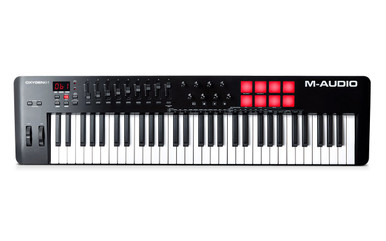
    The M-Audio Oxygen 61 (MKV) MIDI controller is a versatile and powerful tool for music producers and performers. Featuring 61 full size, velocity sensitive keys, this controller offers precise expression and dynamic control. The Oxygen 61 (MKV) includes advanced features such as Smart Chord and Smart Scale technology, a built in arpeggiator, and assignable faders and knobs for seamless integration with digital audio workstations (DAWs). Whether you are producing beats, composing melodies, or performing live, the Oxygen 61 (MKV) enhances your workflow with auto mapped DAW controls and a premium software suite. The included instruments, Hybrid 3 and Mini Grand, provide professional quality sounds, while the bundled Melodics lessons and Skoove subscription help you refine your skills. With a sleek design and robust build, the Oxygen 61 (MKV) is the perfect choice for musicians looking to create modern, cutting edge music.

    Key Features:

    • Smart Chord and Smart Scale technology:
      Play full chords with a single key press and ensure every note fits within the selected scale, simplifying composition.
    • Built in arpeggiator:
      Generate rhythmic melodic patterns with adjustable type, octave, gate, and swing controls for added creativity.
    • Auto mapped DAW integration:
      Seamlessly control transport, faders, pan, and more in major DAWs, including Ableton, Logic, and Pro Tools.
    • Native Instruments NKS support:
      M-Audio Oxygen Keyboards now support Native Instruments NKS, this is a game changer with NI plug ins, allowing you to get making music fast!

    Choose your Exclusive NI bundle

    M-Audio and Native Instruments have partnered together to bring NKS integration to the Oxygen series USB Midi controller keyboards.
    Experience the seamless connection between your Oxygen controller and NI’s legendary sounds with NKS for yourself with the included free Komplete 15 Select Bundle of synths, sampled instruments, and studio effects, all ready to Kontrol with your M-Audio Oxygen keyboard.

    Professional Music Production:

    The Oxygen 61 (MKV) is designed to streamline your music production process. With assignable faders and knobs, you can easily tweak effects, mix tracks, and control virtual instruments in real time. The Note Repeat function makes beat production effortless, allowing you to create intricate rhythms with precision. The auto mapped DAW controls ensure seamless integration with your preferred software, enhancing your creative workflow.

    Premium Software Suite:

    This MIDI controller comes with a comprehensive software package to get you started immediately. It includes two professional DAWs, Ableton Live Lite and MPC Beats, as well as virtual instruments like Hybrid 3, a multi oscillator synthesiser, and Mini Grand, an acoustic piano plugin. Additionally, you receive Expansion Packs from Akai Professional’s MPC Series, giving you access to high quality drum and instrument sounds.

    Learn and Improve Your Skills:

    The Oxygen 61 (MKV) includes over 60 free interactive lessons from Melodics, helping you build your confidence and skills with your MIDI controller. Additionally, a 3 month subscription to Skoove Premium provides in depth online piano courses that adapt to your progress, allowing you to enhance your technique at your own pace with a variety of genres.

    Specifications:

    • 61 full size, velocity sensitive keys
    • 8 velocity sensitive trigger pads with Note Repeat
    • 8 assignable knobs for effect and plugin control
    • 9 assignable faders for mixing and volume control
    • Built in Smart Chord and Smart Scale features
    • Integrated arpeggiator with customisable settings
    • Auto mapping for major DAWs including Ableton, Logic, and Pro Tools
    • Premium software suite including Ableton Live Lite and MPC Beats
    • Includes Hybrid 3 synthesiser and Mini Grand piano plugin
    • Over 60 free interactive lessons from Melodics
    • 3 month subscription to Skoove Premium online piano lessons
    • USB powered for seamless connectivity
  • M-Audio Oxygen 49 MKV MIDI Keyboard & Controller

    M-Audio Oxygen 49 MKV MIDI Keyboard & Controller

    Allow Synth for Sale to introduce you to this M-Audio Oxygen 49 MKV MIDI Keyboard & Controller

    The M-Audio Oxygen 49 (MKV) MIDI controller is a versatile and powerful tool for music producers and performers. Featuring 49 full size, velocity sensitive keys, this controller offers precise expression and dynamic control. The Oxygen 49 (MKV) includes advanced features such as Smart Chord and Smart Scale technology, a built in arpeggiator, and assignable faders and knobs for seamless integration with digital audio workstations (DAWs). Whether you are producing beats, composing melodies, or performing live, the Oxygen 49 (MKV) enhances your workflow with auto mapped DAW controls and a premium software suite. The included instruments, Hybrid 3 and Mini Grand, provide professional quality sounds, while the bundled Melodics lessons and Skoove subscription help you refine your skills. With a sleek design and robust build, the Oxygen 49 (MKV) is the perfect choice for musicians looking to create modern, cutting edge music.

    Key Features:

    • Smart Chord and Smart Scale technology:
      Play full chords with a single key press and ensure every note fits within the selected scale, simplifying composition.
    • Built in arpeggiator:
      Generate rhythmic melodic patterns with adjustable type, octave, gate, and swing controls for added creativity.
    • Auto mapped DAW integration:
      Seamlessly control transport, faders, pan, and more in major DAWs, including Ableton, Logic, and Pro Tools.
    • Native Instruments NKS support:
      M-Audio Oxygen Keyboards now support Native Instruments NKS, this is a game changer with NI plug ins, allowing you to get making music fast!

    Choose your Exclusive NI bundle

    M-Audio and Native Instruments have partnered together to bring NKS integration to the Oxygen series USB Midi controller keyboards.
    Experience the seamless connection between your Oxygen controller and NI’s legendary sounds with NKS for yourself with the included free Komplete 15 Select Bundle of synths, sampled instruments, and studio effects, all ready to Kontrol with your M-Audio Oxygen keyboard.

    Professional Music Production:

    The Oxygen 49 (MKV) is designed to streamline your music production process. With assignable faders and knobs, you can easily tweak effects, mix tracks, and control virtual instruments in real time. The Note Repeat function makes beat production effortless, allowing you to create intricate rhythms with precision. The auto mapped DAW controls ensure seamless integration with your preferred software, enhancing your creative workflow.

    Premium Software Suite:

    This MIDI controller comes with a comprehensive software package to get you started immediately. It includes two professional DAWs, Ableton Live Lite and MPC Beats, as well as virtual instruments like Hybrid 3, a multi oscillator synthesiser, and Mini Grand, an acoustic piano plugin. Additionally, you receive Expansion Packs from Akai Professional’s MPC Series, giving you access to high quality drum and instrument sounds.

    Learn and Improve Your Skills:

    The Oxygen 49 (MKV) includes over 60 free interactive lessons from Melodics, helping you build your confidence and skills with your MIDI controller. Additionally, a 3 month subscription to Skoove Premium provides in depth online piano courses that adapt to your progress, allowing you to enhance your technique at your own pace with a variety of genres.

    Specifications:

    • 49 full size, velocity sensitive keys
    • 8 velocity sensitive trigger pads with Note Repeat
    • 8 assignable knobs for effect and plugin control
    • 9 assignable faders for mixing and volume control
    • Built in Smart Chord and Smart Scale features
    • Integrated arpeggiator with customisable settings
    • Auto mapping for major DAWs including Ableton, Logic, and Pro Tools
    • Premium software suite including Ableton Live Lite and MPC Beats
    • Includes Hybrid 3 synthesiser and Mini Grand piano plugin
    • Over 60 free interactive lessons from Melodics
    • 3 month subscription to Skoove Premium online piano lessons
    • USB powered for seamless connectivity